
Why ERPNext Implementations Fail in the First 90 Days (And How to Prevent It)
Why ERPNext Implementations Fail in the First 90 Days (And How to Prevent It)
 admin
admin
Sixty-eight percent. That’s the overall ERP failure rate reported by Panorama Consulting Group in its most recent industry analysis. If you’re planning an ERPNext rollout, that number should make you pause, not because ERPNext is a bad product, but because most ERP implementation failures have almost nothing to do with the software itself.
ERPNext is open-source, genuinely flexible, and capable of running finance, inventory, manufacturing, and HR for a business of almost any size. That flexibility is exactly why a poorly managed implementation can look fine right up until go-live day, and then quietly fall apart over the following three months. There’s no rigid vendor process forcing discipline on you. You have to bring that discipline yourself.
This article isn’t another generic “plan carefully” checklist. We’re going to walk through the specific, underreported reasons ERPNext implementation failures happen in the first 90 days after launch, back it up with real numbers, and give you a concrete way to avoid becoming one of them.
The Real Numbers Behind ERP Implementation Failure
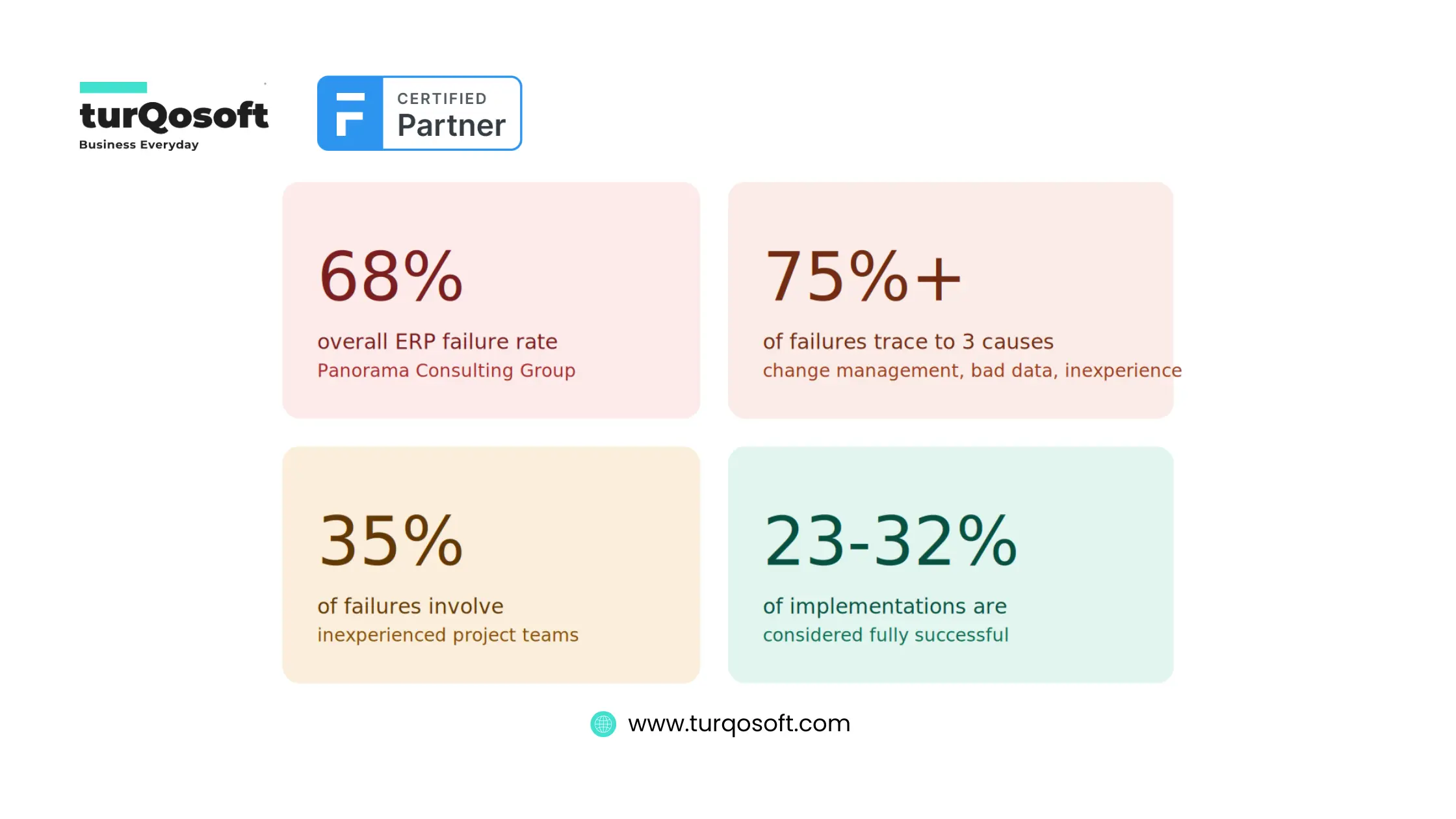
Before getting into the “why,” it helps to see the scale of the problem. These aren’t vendor marketing stats. They come from independent research firms tracking ERP outcomes across industries.
| Statistic | Source |
|---|---|
| Only 23–32% of ERP implementations are considered fully successful by any reasonable measure | Cudio |
| Inadequate change management, poor data migration, and inexperienced teams account for over 75% of failures combined | Kreative Core Tech |
| 35% of failures involve inexperienced project teams — typically the partner’s staff, not the client’s | Cudio |
| Overall ERP failure rate sits at roughly 68% | Panorama Consulting |
The software passing every demo doesn’t mean much. The implementation team’s experience and the client’s own readiness matter far more than which ERP you picked.
Why ERPNext’s Open-Source Nature Cuts Both Ways
Reviewers on G2 consistently point out that ERPNext stands out for its open-source flexibility, letting companies shape the software around their own processes rather than the other way around. That’s a real advantage, especially for small businesses that don’t want to bend their operations to fit rigid software.
But here’s the catch nobody tells you upfront: that same flexibility removes the guardrails a paid, opinionated system like NetSuite or SAP would normally provide. Nobody is forcing you into a proven rollout sequence. If your team (or your partner) skips a step, ERPNext will happily let you.
The 90-Day Window That Decides Everything
Go-live day gets all the attention. It shouldn’t. The 90 days that follow are what actually determine whether your team sees the ERP as a genuine improvement or a daily headache. By day 90, most staff have already made up their minds — and reversing a bad first impression takes far longer than building a good one from the start.
Industry consultants call the immediate post-go-live period “hypercare” — a structured two-to-four-week stabilization window where support is elevated and every process gets watched closely. Most ERPNext rollouts for small and mid-sized businesses skip this step entirely. The implementation partner finishes the project, hands over credentials, and moves on. That’s usually where things start to slip.
One pattern shows up again and again in post-mortems: a company declares the project done on go-live day, releases its consultants, and hands support to an overwhelmed internal help desk. Within weeks, finance staff are back to running numbers in spreadsheets because nobody trained them past the basics, and inventory counts stop matching reality. Recovering credibility after that takes far longer than doing hypercare properly in the first place.
What “Stabilization” Actually Means Day to Day
A solid post-implementation plan isn’t vague reassurance — it’s a specific schedule. That typically means training sessions at go-live and again at the 30, 60, and 90-day marks, a working feedback loop for user complaints, and KPIs tracked against targets set before the project even started. If your implementation plan doesn’t have dates attached to any of that, it’s not really a plan.
The 6 Real Reasons ERPNext Implementations Fail
Here’s where most advice gets vague. These are the specific, recurring failure points we’ve seen and that show up across ERP research and Frappe’s own community forums.
1. Change Management Gets Skipped, Not Just Underfunded
Software doesn’t push back against a new system. People do. Implementations tend to fail when the team spends all its energy on configuration and none on the humans who’ll actually use the thing every day, as ECI Solutions points out.
There’s a telling story from the Frappe community: an implementer got full buy-in from leadership, built out a working ERPNext solution, and then presented it to the actual end-users — who pushed back hard because the features didn’t match how they actually worked day to day. The lesson isn’t subtle. Sell the system to the people who’ll be typing into it every morning, not just the person signing the invoice.
Get frontline staff in the room during requirements gathering, not just during a training session after everything is already built.
2. Dirty Data Gets Migrated As-Is
Data migration sounds like a technical checkbox. It’s usually where projects quietly die. One manufacturing company discovered during its ERP rollout that products marked as “in stock” didn’t actually exist, while items flagged as discontinued were actually their best sellers. The software ran perfectly. The data feeding it was garbage.
Before any migration into ERPNext, run through this short checklist:
- Deduplicate customer, supplier, and item records
- Validate current stock counts against a physical count, not just the old system’s numbers
- Reconcile open ledger balances before they get carried forward
- Flag and clean any records with missing units of measure, tax codes, or pricing
A clean ERP running on bad data will produce confident, wrong answers — which is worse than no data at all.
3. Inexperienced Implementation Partners
This one stings because it’s largely invisible until it’s too late. Partner-driven failure usually looks like a slow, quiet mess rather than a dramatic collapse: missed requirements, integrations that work fine in testing but break under real load, and support that thins out right after the invoice clears.
A pattern worth watching for: the senior engineers who ran your pre-sales demos, who asked sharp questions about your workflows and seemed to genuinely understand your business, aren’t necessarily the people who show up to do the actual build. Sometimes a junior or offshore team takes over after the contract is signed, and that’s when basic questions about your industry start reappearing.
Questions worth asking a potential partner before signing anything:
| Question | Why it matters |
|---|---|
| Who specifically will be on the build team, and will they stay through go-live? | Confirms you’re not getting a bait-and-switch on staffing |
| Can I speak to two references from a similar-sized business in my industry? | Filters out partners who oversell general experience |
| What does support look like in the first 90 days after go-live, specifically? | Reveals whether hypercare is even part of their plan |
| How do you handle data migration validation before go-live? | Tests whether they treat data seriously or as an afterthought |
4. No Domain Expert on the Implementation Team
Sometimes the platform is fine and the team is competent, but nobody involved actually understands the industry well enough to configure it correctly. One documented case involved a student-management use case where a lack of domain expertise on what ERPNext could realistically handle led directly to a failed rollout, even though the underlying platform was sound.
Ask your partner directly whether they’ve implemented ERPNext for a business like yours before, not just whether they know ERPNext in general.
5. Report and Process Performance Bottlenecks After Go-Live
This is a technical cause that’s frequently mistaken for a software failure. A system that runs fine in testing, with a handful of sample records, can behave completely differently once real transaction volume hits it. A common symptom: report generation that used to take seconds starts queuing up and taking 20-plus minutes once daily usage ramps up, simply because the hosting infrastructure wasn’t sized for production load.
This is fixable, but it needs to be caught early. If your team is complaining that reports are slow or the system feels sluggish a few weeks after go-live, that’s usually a server capacity conversation, not a software bug.
Budget for a hosting review at the 30-day mark, not just at launch. Traffic and data volume in week one rarely match week eight.
6. Heavy Customization Without Governance
ERPNext’s flexibility invites customization, and customization isn’t the enemy. Unmanaged customization is. Heavy modification tends to drive up development costs and stretch out timelines, and systems that get over-modified become genuinely hard to maintain or upgrade down the line.
Every customization request should go through a quick cost-benefit check — does this really need custom code, or is there a configuration-only way to get the same result?
How to Prevent These Failures: A First-90-Days Playbook
Training has to happen inside the live system, using real processes and real data, not a sandbox environment. Skip that step and staff will drift back to Excel the moment something feels unfamiliar.
Throughout the first 90 days, someone on your team (or your partner’s) should be actively watching:
- Integration errors between ERPNext and any connected systems
- Batch and report performance under real daily load
- Master data quality — new records being entered incorrectly
- Posting accuracy in accounting entries
- Patterns in user support tickets — repeated questions point to a training gap, not a user problem
Businesses that get this right tend to do a few things consistently: they staff hypercare properly, put someone on the floor who can answer questions in real time, hold short weekly check-ins with department heads, and actually measure adoption rather than assuming it’s happening.
A practical 90-day checklist:
- Run a full data audit before migration, not after
- Vet your implementation partner using the questions above
- Set a training cadence for day 1, day 30, day 60, and day 90
- Review hosting capacity at the 30-day mark once real usage data exists
- Set up a weekly feedback channel for end users during the first quarter
- Review every customization request against a simple cost-benefit filter
Conclusion
ERPNext implementation failures are rarely a software problem. They’re a discipline problem, a data problem, and a people problem, and nearly all of it plays out in the 90 days after go-live rather than during the build itself.
If you’re planning an ERPNext rollout, or you’re a few weeks into one and already seeing warning signs like slow reports, staff reverting to old habits, or a partner who’s gone quiet, it’s worth getting a second set of eyes on it before small issues turn into expensive ones.
Want to get a ERPNext implementation readiness check? Get in touch with our team via email at info@turqosoft.com or by giving us a call at +91 9841205845.
Alternatively, stay connected with us on various social media platforms such as LinkedIn, YouTube, Facebook, Twitter, Pinterest, or Instagram to receive regular updates on ERPNext and other pertinent topics.
Image Credit: Canva