
ERPNext for Multi-Location Business: How to Structure Branches, Warehouses, Inventory & Finance

ERPNext for Multi-Location Business: How to Structure Branches, Warehouses, Inventory & Finance
 admin
admin
A company opens its second branch. Then a third warehouse. Later, a service centre is added in another district.
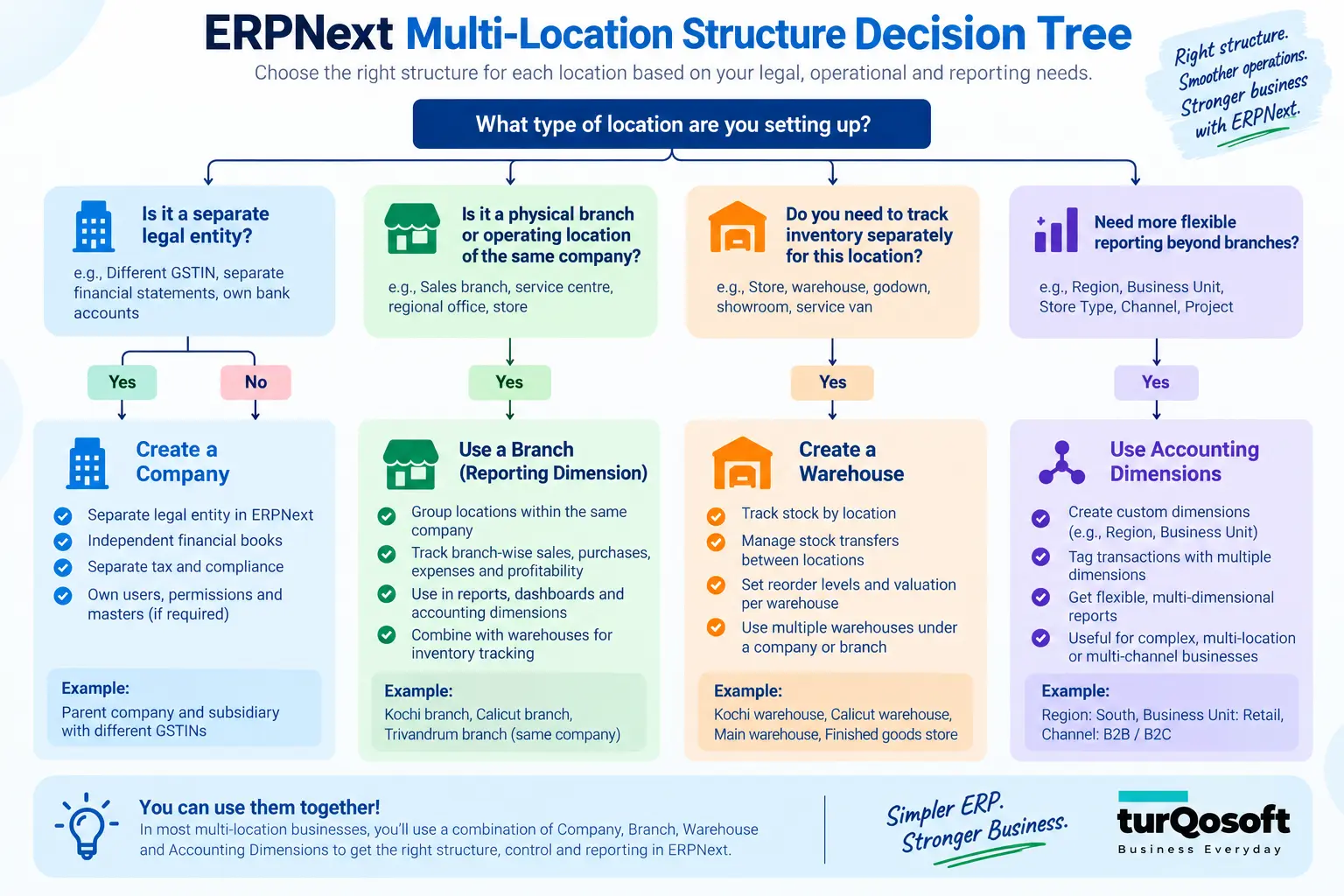
At that point, a deceptively simple ERP question appears: Should each location be created as a separate Company, a branch, a warehouse, a Cost Center—or something else inside ERPNext?
Getting that decision wrong at the beginning can affect stock visibility, branch profitability, user access, inter-location transfers and financial reporting later.
ERPNext for a multi-location business can support multiple legal entities, warehouses, reporting dimensions and operating locations. But those are building blocks. The real implementation work is deciding how those building blocks should represent the way your business actually operates.
ERPNext for Multi-Location Business: Structure It Right
ERPNext’s official documentation makes an important distinction: a Company represents a legal entity whose accounts, taxes, stock valuation and financial statements are maintained together. If several locations belong to the same legal entity, structures such as Cost Centers, Accounting Dimensions and Warehouses may be more appropriate than creating a separate Company for each branch.
This guide explains how to make those decisions before configuration begins.
Can ERPNext Manage a Multi-Location Business?
Yes. ERPNext can be structured for businesses operating across multiple Companies, branches, warehouses and other operating locations.
Depending on the business requirement, ERPNext can support:
- multiple legal Companies
- multiple warehouses under each Company
- stock balances by Item and Warehouse
- Cost Centers and Accounting Dimensions for management reporting
- role-based permissions
- user-level restrictions
- inter-company transactions
- stock transfers between warehouses
- Goods in Transit
- consolidated or group-level financial reporting where applicable
The important point is that “multi-location” does not describe one ERP structure.
A second location could be:
- a separate incorporated company
- another branch of the same company
- only a warehouse
- a retail outlet
- a factory
- a service centre
- a management reporting unit
Each situation can require a different design.
That is why a proper ERPNext multi-location implementation should start with the business structure before anyone starts creating warehouses or importing transactions.
Before Configuring ERPNext, Decide What Each Location Actually Represents
Businesses often use terms such as branch, outlet, depot, office, warehouse and plant interchangeably in everyday conversation.
ERPNext cannot be structured accurately based only on those labels.
For every location, first ask:
- Is this a separate legal entity?
- Does it keep separate statutory or accounting books?
- Does physical stock exist there?
- Do we need to measure its revenue, expenses or profitability separately?
- Should users at the location be restricted to their own transactions?
- Can it transact independently with customers or suppliers?
The answers determine which ERPNext structures are appropriate.
When a Location Should Be a Separate Company
In ERPNext, a Company should represent a distinct legal/accounting entity.
Official ERPNext documentation recommends creating separate Companies when entities maintain separate books or statutory registrations. A Company’s transactions, accounts, taxes, stock valuation and financial statements are maintained together.
A separate Company may therefore be appropriate for situations such as:
- two separately incorporated businesses
- a parent and subsidiary
- group companies maintaining their own ledgers
- entities requiring separate statutory reporting
A physical location by itself is not enough reason to create another Company.
If Kochi, Thrissur and Calicut are simply operating branches of the same legal business with one set of books, creating three separate Companies may unnecessarily complicate accounting and transactions.
The final statutory structure should always be validated with the company’s finance and tax advisers.
When a Location Is an Operating Branch
Suppose the business is one legal Company but has three branches.
Management may want:
- sales by branch
- expenses by branch
- branch profitability
- inventory by branch
- branch-specific users
- branch-level approval responsibility
That does not automatically require three ERPNext Companies.
A branch can be represented through a combination of structures such as:
- Cost Centers
- Accounting Dimensions
- warehouses
- user permissions
- transaction defaults
depending on what the business wants to measure and control.
ERPNext Accounting Dimensions are specifically intended to add reporting segments such as branch, department, channel or business unit without unnecessarily expanding the Chart of Accounts.
When a Location Should Be a Warehouse
A Warehouse answers a different question: Where is the stock physically held?
ERPNext maintains stock balances for each distinct combination of Item and Warehouse. Warehouses can also be organized hierarchically.
A single branch can therefore have several warehouses.
For example:
Kochi Branch
- Kochi Main Warehouse
- Kochi Service Stock
- Kochi Damaged Stock
All three may belong to the same branch and the same legal Company, yet the inventory needs to remain separately identifiable.
This distinction matters.
A branch represents an operating or reporting responsibility. A warehouse represents where inventory is held.
They often overlap physically, but they are not the same concept.
When to Use Cost Centers or Accounting Dimensions
A business may also need reporting that has nothing to do with legal entities or stock locations.
For example:
Branch: Kochi
Department: Service
Revenue Account: Service Income
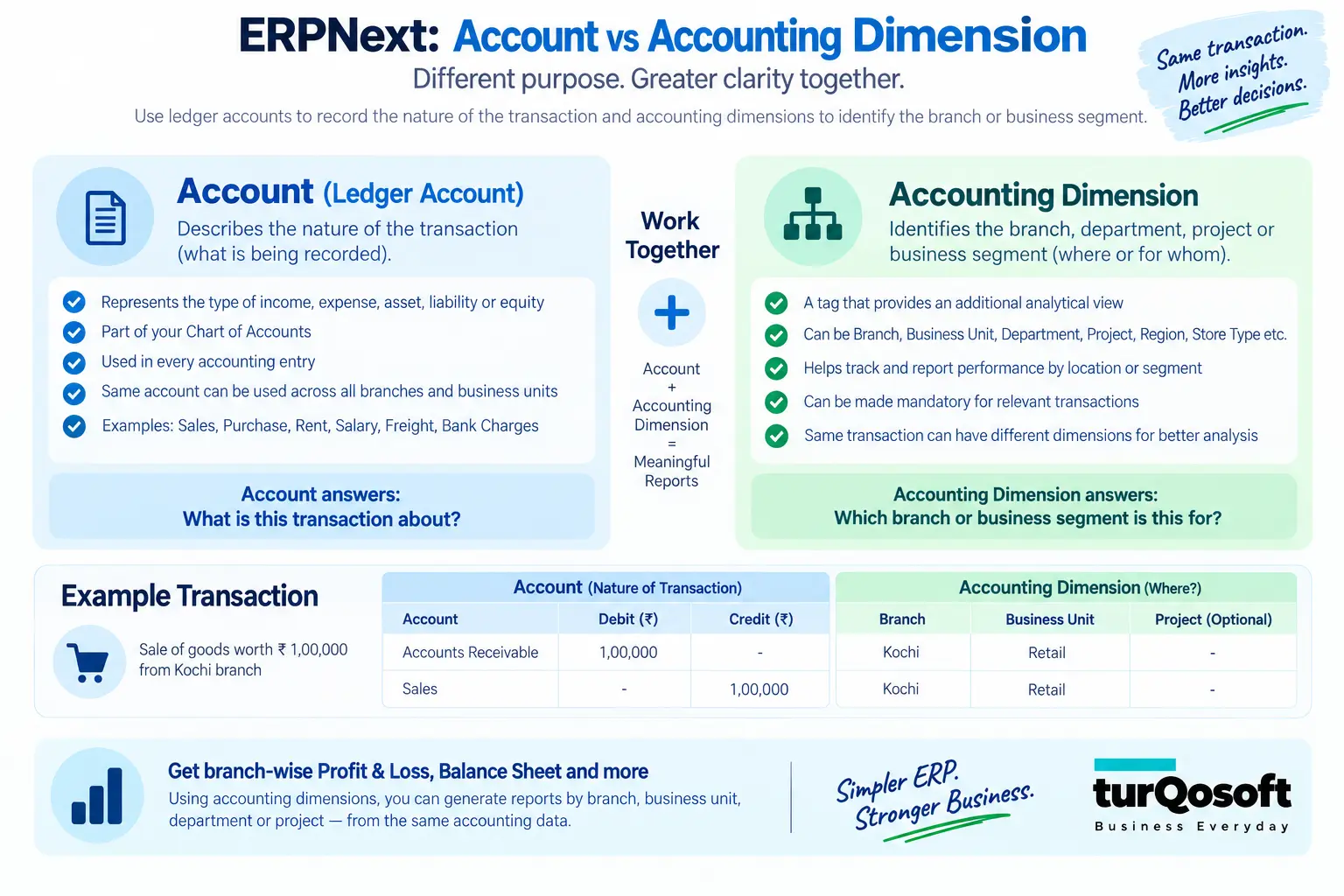
The revenue account answers what type of financial activity occurred.
The dimensions answer where or within which business segment it occurred.
ERPNext Accounting Dimensions can create additional classification fields on accounting transactions and supported financial reports. Dimensions can also be made mandatory for Profit and Loss postings, helping prevent income or expenses from being recorded without the required classification.
That becomes particularly useful when management expects reliable branch-level profitability.
Company vs Branch vs Warehouse vs Dimension
| Business Requirement | Likely ERPNext Structure |
| Separate legal entity with separate books | Company |
| Operating branch within the same legal entity | Cost Center / Accounting Dimension as appropriate |
| Physical stock location | Warehouse |
| Branch-level profitability analysis | Cost Center / Accounting Dimension |
| Group containing separate legal entities | Parent and child Company structure |
| Multiple stock areas within one branch | Separate Warehouses |
| Department or business unit reporting | Accounting Dimension / Cost Center |
This is a design framework, not a universal configuration rule. Legal structure, taxation, accounting policy and actual operational processes must be considered together.
One Company With Several Branches vs Multiple Companies
One of the most important decisions in a multi-location ERPNext implementation is whether the organization needs:
one Company with several operating branches
or
several separate Companies inside the same ERPNext environment.
One Company With Several Operating Locations
Imagine a trading business registered as one legal Company with branches in Kochi, Thrissur and Calicut.
A possible ERPNext structure could be:
ABC Trading Pvt. Ltd.
→ Kochi
→ Thrissur
→ Calicut
with separate warehouses and reporting dimensions for the locations.
The business can maintain common masters such as Items, Customers and Suppliers while using location-specific structures for stock and management reporting.
This approach may be suitable where:
- the branches belong to the same legal entity
- accounting books are common
- management wants branch-level analysis
- operational control varies by location
Multiple Legal Companies
Now consider a group containing:
ABC Trading Pvt. Ltd.
and
ABC Manufacturing Pvt. Ltd.
If they are separate legal entities with separate books, they should normally exist as separate Companies in ERPNext.
ERPNext supports multiple Company records, with accounting maintained separately for each entity. Shared masters such as Customers, Suppliers and Items can still exist at the site level.
What Happens When Two Companies Trade With Each Other?
ERPNext also provides an Inter Company Invoice workflow.
When one Company sells to another Company in the same ERPNext site, a submitted Sales Invoice can be used to create a corresponding Purchase Invoice for the buying Company. The two Companies retain their separate receivable and payable ledgers.
This is fundamentally different from moving stock between two warehouses belonging to the same Company.
That difference is another reason the legal and accounting structure should be agreed before the system is configured.
| Question | One Company + Branches | Multiple Companies |
| Separate legal entity | Usually no | Yes |
| Separate accounting books | Usually no | Yes |
| Separate warehouses | Possible | Possible |
| Branch reporting | Dimensions / Cost Centers | Company-level reports |
| Inter-company invoices | Not applicable between branches of same Company | Applicable where entities trade |
| Group reporting | Within common books | Consolidated/group reporting where configured |
How to Design Warehouses for Multiple Locations
Warehouse design should begin with the real movement and storage of inventory—not with how many branches appear on the company’s website.
Ask:
- Where is inventory physically stored?
- Does each branch hold stock?
- Does the branch have separate main, damaged or service stock?
- Is stock temporarily held in transit?
- Does a manufacturing location need separate raw material, WIP and finished-goods warehouses?
ERPNext supports group and child Warehouses, and stock balances are maintained at the Item + Warehouse level.
A distributor could therefore use a structure such as:
Kerala Warehouses
- Kochi
- Kochi Main
- Kochi Service
- Thrissur
- Thrissur Main
- Calicut
- Calicut Main
There is, however, a practical limit to useful granularity.
Creating a separate Warehouse for every room, rack and shelf may look precise during implementation, but it also increases transaction choices and reconciliation work.
Create additional warehouse levels when the business genuinely needs to:
- know the stock separately
- control movement separately
- restrict access separately
- reconcile it independently
If the objective is simply to record a physical shelf number, another data structure may be more appropriate than creating hundreds of financial inventory locations.
For deeper discussion of replenishment and distributor inventory control, link internally to Turqosoft’s How ERPNext Helps Distribution Businesses Fix Multi-Location Inventory Chaos article.
How Inter-Branch Stock Movement Should Work
A statement such as “ERPNext supports stock transfer between branches” is technically correct but does not explain what happens operationally.
There are two common situations.
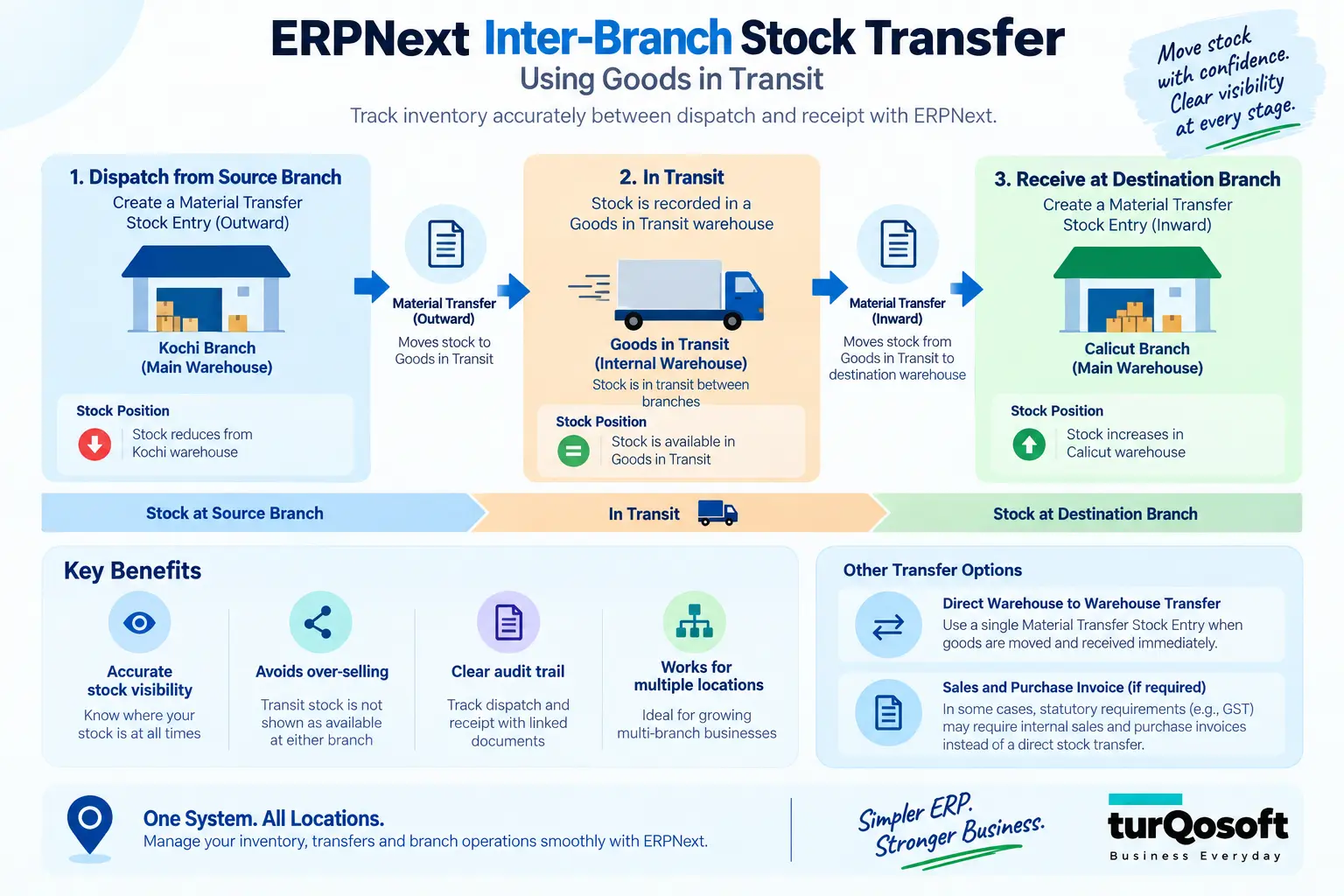
Direct Warehouse-to-Warehouse Transfer
When both sides of the transfer can be recorded as one controlled movement, stock can move from: Kochi Warehouse → Calicut Warehouse using a Material Transfer Stock Entry.
When Goods Spend Time in Transit
Suppose Kochi dispatches goods today and Calicut receives them tomorrow.
During that period, the goods should ideally not appear as available stock in either active branch warehouse.
ERPNext supports a Goods in Transit process using Material Transfer Stock Entries.
The workflow is: Source Warehouse → Goods in Transit → Destination Warehouse
The outward transaction records that the goods have left the sending warehouse. The receiving transaction later records that they reached the destination.
This gives both branches a clearer operational position:
- Kochi has dispatched the goods
- Calicut has not yet received them
- management can still see that inventory exists in transit
That distinction becomes particularly important when branches are geographically separated or when dispatch and receipt are handled by different teams.
When Tax or Legal Structure Changes the Transfer
Not every branch transfer should automatically be handled through the same process.
ERPNext documentation also describes situations where statutory requirements may require material transfers to be represented using internal Sales and Purchase Invoices rather than only Stock Entries. The correct GST treatment depends on the registration, address and tax configuration.
The finance or tax team should therefore agree the statutory treatment before the ERP workflow is finalized.
How to Get Reliable Branch-Wise Profitability and Financial Reporting
Many businesses say: “We need branch-wise P&L.”
The technical report is only one part of the solution.
The larger issue is ensuring that every relevant transaction is consistently classified to the correct branch.
Use the Right Financial Dimension
ERPNext Cost Centers identify where income and expense belong. Accounting Dimensions can add other analytical segments such as branch, department, channel or business unit.
For example:
Expense Account: Electricity
Branch: Kochi
or:
Revenue Account: Product Sales
Branch: Calicut
Department: Retail
The account tells finance what the transaction represents.
The dimension tells management which part of the organization it belongs to.
Make Critical Dimensions Mandatory Where Necessary
ERPNext allows an Accounting Dimension to be made mandatory for Profit and Loss accounts and, where appropriate, Balance Sheet accounts.
This can solve a common reporting problem.
If management expects a P&L by branch but employees are allowed to post expenses without selecting a branch, the report will eventually contain unallocated values.
The ERP cannot infer the correct branch after the fact.
A well-designed implementation therefore decides:
- which transactions require branch classification
- where the branch should default automatically
- when users may change it
- whether missing dimensions should block posting
Decide What Happens to Shared Expenses
Some costs clearly belong to one branch:
- branch rent
- branch electricity
- local delivery expense
Others may be shared:
- head-office administration
- central marketing
- audit fees
- corporate software subscriptions
Management needs an accounting policy for these costs.
Options may include:
- leave them at head office
- allocate them to branches
- assign them directly where possible
ERPNext can record the classifications, but the business must decide the treatment.
Centralized vs Branch-Level Procurement
Multi-location ERP design should also reflect who is allowed to purchase.
There are three common models.
Centralized Procurement
Branches identify requirements, but head office controls purchasing.
A simplified flow might be: Branch Requirement → Head Office Review → Purchase Order → Delivery to Branch
This model can help an organization negotiate centrally and maintain stronger purchasing control.
Decentralized Procurement
Individual branches may be permitted to purchase locally.
The ERP design then needs rules covering:
- who can raise the requirement
- who can approve it
- which suppliers can be used
- purchasing limits
- receiving warehouse
- accounting responsibility
Hybrid Procurement
Many organizations need both.
For example:
- routine low-value items can be purchased locally
- major stock orders require head-office approval
- strategic vendors are controlled centrally
The implementation question is therefore not simply: “Does ERPNext support purchasing?”
It is: “Who should be allowed to initiate, approve and receive each type of purchase at each location?”
Once that operating policy is clear, roles, permissions, workflows and transaction defaults can be designed around it.
How Sales Should Work Across Multiple Locations
The same principle applies to sales.
A multi-location company needs to decide:
- who owns the customer relationship
- which branch owns the Sales Order
- which warehouse fulfils it
- who controls pricing
- whether branches share customers
- who can approve discounts
- how revenue is attributed
Consider an illustrative scenario.
A customer places an order through the Kochi branch, but the required stock is available only in Thrissur.
The business could decide to:
- transfer the stock to Kochi first
- fulfil the order directly from Thrissur
- use another internally agreed process
The correct ERP workflow depends on commercial ownership, delivery responsibility, accounting and inventory policy.
This is why copying one branch’s process across every location without reviewing exceptions often creates problems later.
ERPNext should implement the agreed operating model. It should not be expected to invent the policy.
How to Restrict Users by Branch, Company or Responsibility
Running every location in one ERP does not mean every employee should see everything.
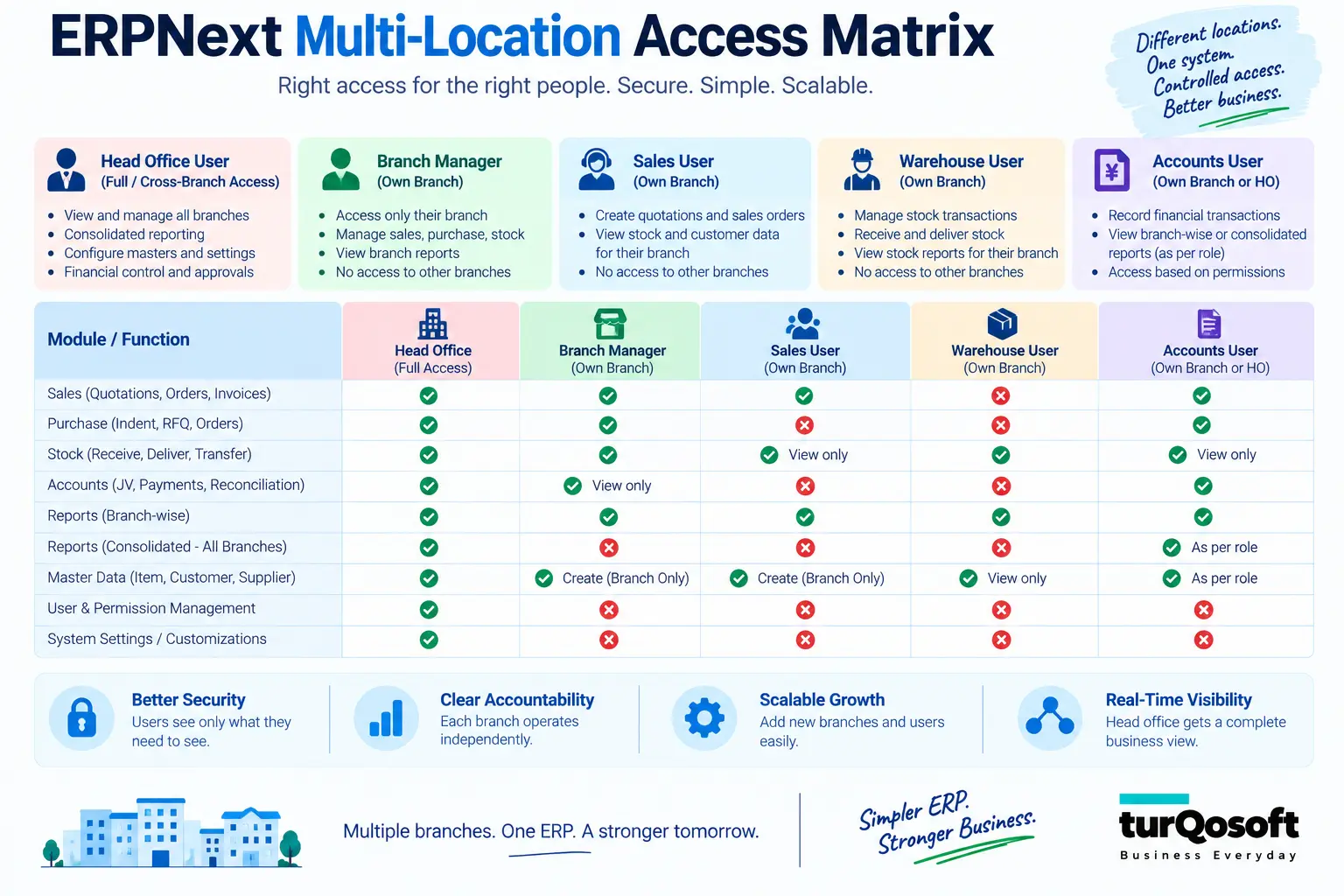
ERPNext uses two important permission concepts.
Roles determine what a user can do.
For example, Role Permissions can control whether a role can:
- read
- create
- write
- submit
- amend
- export
documents of a particular type.
User Permissions can further restrict which specific linked records a user can access.
ERPNext documentation gives examples of restricting users to selected Territories or Companies through linked-document permissions.
Branch Salesperson
May require access to:
- Quotations
- Sales Orders
- customers relevant to their work
They may not need organization-wide financial information.
Warehouse Executive
May need:
- receipts
- Stock Entries
- transfers
- stock reports relevant to assigned locations
Branch Accountant
May require financial transactions related to their branch responsibilities.
Head-Office Finance Manager
May require:
- cross-location visibility
- financial reports
- approval access
- group-level information
The exact restriction model should be tested carefully.
A sophisticated requirement such as “a salesperson can see this customer but only orders created by their branch, except when temporarily supporting another branch” may require additional configuration or custom logic.
Do not assume that every record-access requirement is solved simply by creating a role.
How Head Office Gets a Consolidated View
Centralized management visibility is usually one of the main reasons a multi-location company adopts ERP.
But “one dashboard” can mean several different things.
Operational Visibility
Management may want to see:
- stock by warehouse
- sales transactions
- purchase activity
- outstanding receivables
- branch inventory movement
ERPNext maintains stock per Item and Warehouse and provides stock reports that can be filtered by warehouse.
Financial Visibility Within One Company
If the branches belong to one legal Company, Cost Centers or Accounting Dimensions can be used for management segmentation.
That allows management to analyze financial information by the dimensions implemented in the accounting structure.
Group Reporting Across Separate Companies
Where the organization contains several legal Companies, each retains its own books.
Group structures and consolidated reporting can then be used where applicable instead of mixing all accounting entries into one Company.
A distinction should also be made between:
- standard ERPNext reports
- management dashboards or custom reports
A management team may ask for very specific KPIs—such as branch sales target attainment, slow-moving stock, gross margin, overdue receivables and purchase commitments on one screen.
That type of executive dashboard may require additional reporting or customization even when the underlying data already exists in standard ERPNext.
Common Multi-Location ERPNext Design Mistakes
The structural mistakes made before go-live are often harder to fix than individual transaction errors later.
1. Creating a Company for Every Physical Branch
A branch is not automatically a legal Company.
Creating unnecessary Companies can introduce separate books, accounts, warehouse structures and inter-company transactions where none were required.
Start with the legal and accounting structure first.
2. Treating Every Branch as Only a Warehouse
A warehouse tracks inventory.
A branch may also have:
- revenue
- expenses
- employees
- approvals
- customer responsibility
- financial reporting requirements
Warehouse structure alone may therefore be insufficient.
3. Creating Too Many Warehouses
More detail is not always more control.
If users constantly have to choose between dozens of unnecessary storage locations, transaction errors can increase.
Create warehouses where separate inventory visibility serves a real operational purpose.
4. Allowing Branch Classification to Remain Optional
If management expects branch-wise profitability, relevant transactions need consistent branch attribution.
Mandatory Accounting Dimensions can help prevent unclassified Profit and Loss postings where that rule is appropriate.
5. Giving Every User Organization-Wide Access
A single ERP database does not require unrestricted visibility.
Role and User Permissions should reflect operational responsibility.
6. Ignoring Stock in Transit
If goods take time to travel between branches, immediately moving stock into the destination warehouse can create a misleading picture.
Goods in Transit allows dispatch and receipt to be recorded separately.
7. Designing Workflows Before Agreeing Who Has Authority
Before configuring approval workflows, management should decide:
- who can purchase
- who approves discounts
- who approves branch expenses
- whether branches set their own prices
- when head office must intervene
Software configuration cannot replace these management decisions.
8. Importing Duplicate Masters From Every Branch
Suppose three branches currently use separate Tally or Excel files.
The same customer might appear as:
- ABC Traders
- ABC Traders Pvt. Ltd.
- A.B.C. Traders
Importing all three without review creates duplicate masters from day one.
Master-data consolidation should occur before migration.
9. Reproducing Every Legacy Branch Practice
Different branches often develop different workarounds over time.
That does not mean every variation should be preserved in the ERP.
Implementation is an opportunity to decide which differences are genuinely necessary and which processes should be standardized.
For a deeper framework on deciding between standard functionality and development, link internally to Turqosoft’s ERPNext Customization: What Should You Customize—and What Should You Leave Standard?
Example ERPNext Structures for Different Multi-Location Businesses
The examples below are illustrative. They are not customer implementations or universal templates.
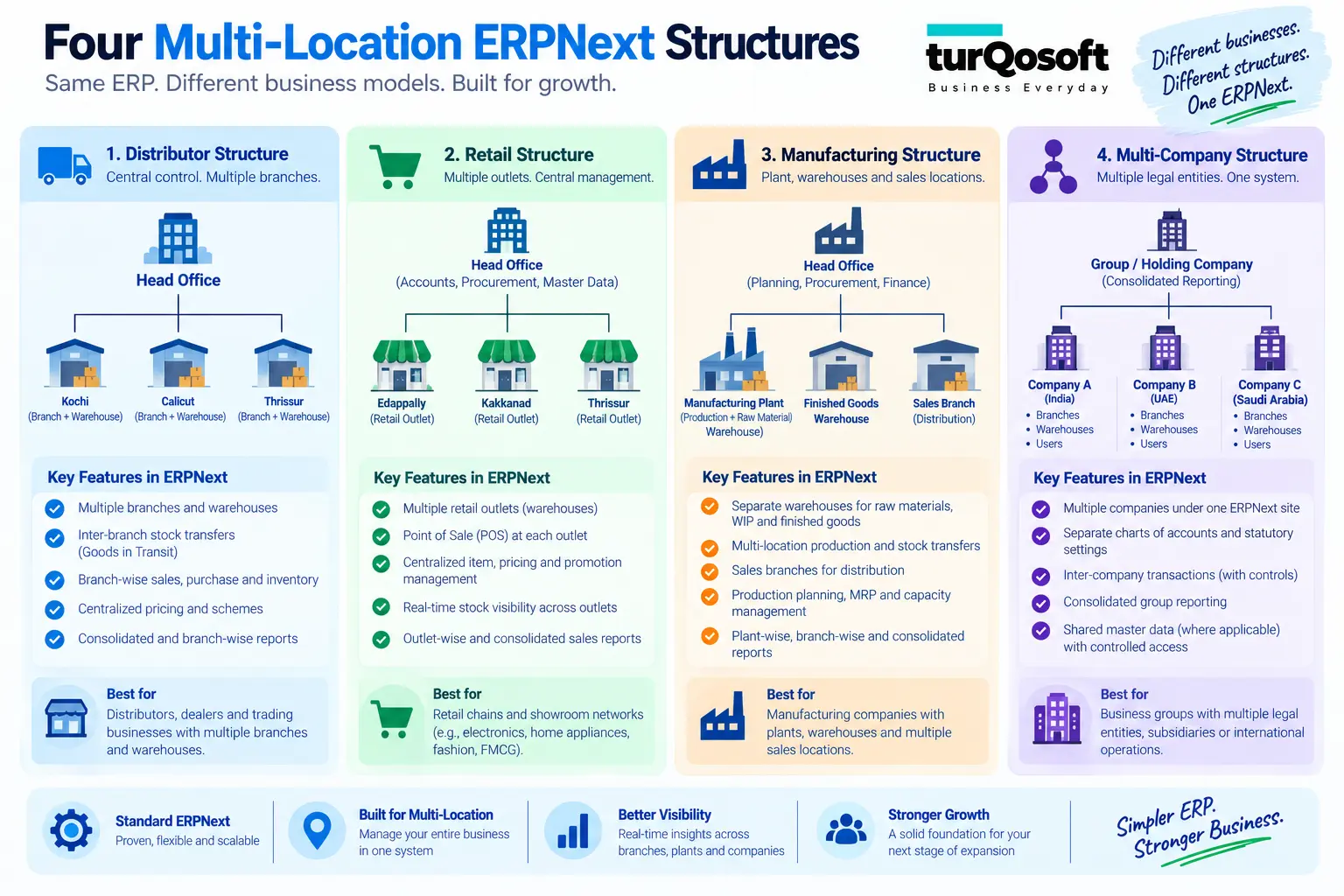
Distribution Company
A distribution company operating under one legal entity might have:
Company
→ Head Office
→ Kochi Warehouse
→ Thrissur Warehouse
→ Calicut Warehouse
A branch or territory dimension could support management reporting, while warehouse structure controls stock by location.
Purchasing might remain centralized while inventory is distributed.
Home-Appliance Retail Chain
A retailer could operate:
One legal Company
→ Central Warehouse
→ Kochi Retail Outlet
→ Thrissur Retail Outlet
→ Service Centre
The service centre may need its own stock location for:
- spare parts
- customer repair items
- standby products
but that does not necessarily make it a separate legal Company.
Manufacturing Business
A manufacturer may require:
Company
→ Factory
- Raw Material Warehouse
- Work-in-Progress Warehouse
- Finished Goods Warehouse
→ Kochi Sales Warehouse
→ Calicut Sales Warehouse
The warehouse hierarchy follows the physical flow of material, while sales branches and financial reporting may require separate dimensions.
Group With Multiple Legal Entities
A business group could have:
Parent Group
→ Manufacturing Company
→ Trading Company
Both Companies maintain their own books and Company-specific warehouses.
Where one entity sells to the other, ERPNext’s Inter Company Invoice process may be used when the business and accounting requirements support it.
How to Migrate Separate Branch Data Into One ERPNext Structure
For many Indian SMEs, the technical challenge begins before configuration.
Different branches may currently maintain:
- separate Tally companies
- Excel stock sheets
- independent customer masters
- different item codes
- local price lists
Combining them requires more than exporting files and importing them into ERPNext.
A typical migration exercise may include:
- collect data from each branch
- identify duplicate Customers and Suppliers
- standardize Item Codes and Units of Measure
- agree the Chart of Accounts mapping
- map each source location to the new warehouse/dimension structure
- prepare opening stock and balances
- import into ERPNext
- reconcile branch-wise and company-wide totals
The business also needs to decide whether it really requires historical transactions or only clean masters, opening balances and outstanding items.
Turqosoft’s dedicated Tally to ERPNext Migration Guide covers migration scope and reconciliation in more detail.
The important point for a multi-location project is that migration should follow the new approved structure, not simply reproduce each branch’s existing database.
Should ERPNext Be Rolled Out to Every Branch at Once?
There is no universally correct rollout method.
The decision usually comes down to operational readiness, branch similarity, data quality and project risk.
Big-Bang Rollout
Every location goes live together.
This may work where:
- processes are already standardized
- branch data is prepared
- user groups can be trained together
- integrations are ready
- management can support one coordinated cutover
The advantage is avoiding a long period in which old and new systems operate together.
The disadvantage is a larger go-live event.
Phased Rollout
Another approach is: Pilot Branch → Stabilize → Next Branches → Remaining Locations
This can allow the team to learn from early implementation issues.
But phased rollout is not automatically cheaper or easier.
It can require:
- repeated training
- temporary coexistence of systems
- additional migration cycles
- procedures for transactions moving between live and non-live branches
The rollout strategy should therefore be selected because it fits the business—not because “phased” sounds safer.
Whichever method is chosen, the project should address:
- process standardization
- data preparation
- UAT
- training
- opening balances
- opening stock
- reconciliation
- cutover
- post-go-live support
Turqosoft’s article on ERPNext Support After Go-Live can be linked here for readers evaluating hypercare and ongoing support responsibilities.
When Does a Multi-Location ERPNext Setup Need Customization?
Many multi-location requirements can be handled through standard ERPNext capabilities and proper configuration.
Examples include:
- Companies
- Warehouses
- Material Transfers
- Goods in Transit
- Cost Centers
- Accounting Dimensions
- Roles
- User Permissions
- Inter Company Invoices
- standard financial and stock reports
Customization may become relevant when requirements go beyond those standard structures.
Examples could include:
- specialized branch approval logic
- unusual replenishment rules
- custom transfer documentation
- external logistics integrations
- legacy-system integrations
- specialized mobile applications
- custom management dashboards
- business-specific incentive calculations
The correct sequence should usually be: Standard ERPNext → Configuration → Customization where justified rather than starting with development.
This helps avoid building custom logic for a requirement that standard ERPNext could already satisfy.
For a detailed fit-gap approach, link to Turqosoft’s ERPNext Customization guide.
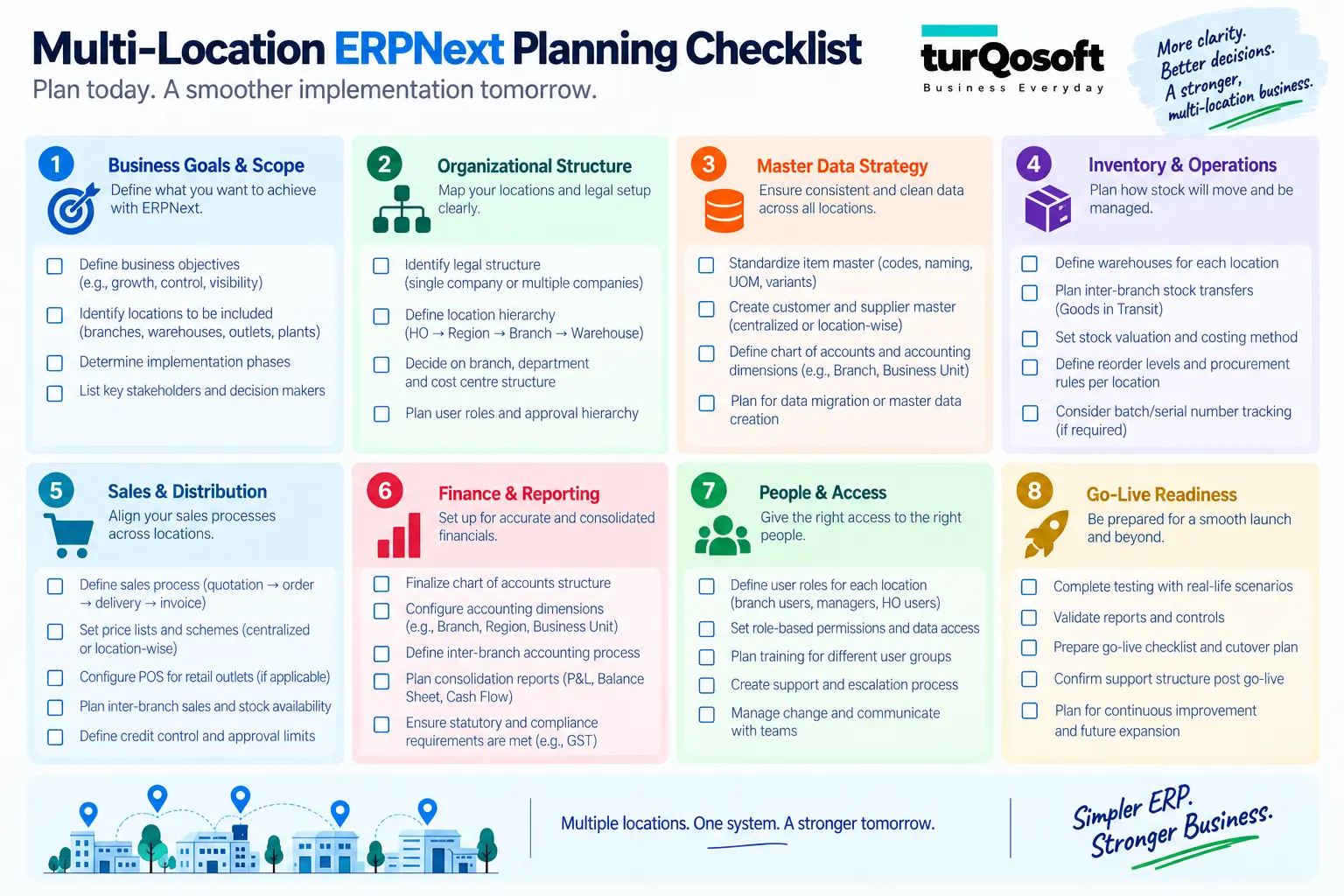
Multi-Location ERPNext Planning Checklist
Before asking an implementation partner to configure the system, answer these questions internally.
Legal and Accounting Structure
- How many separate legal entities exist?
- Which locations require separate statutory or accounting treatment?
- Do any entities transact with each other?
- Is consolidated group reporting required?
Branch and Warehouse Structure
- How many operating branches exist?
- How many physical stock locations exist?
- Does any branch have multiple warehouses?
- Is Goods in Transit required between locations?
Operational Authority
- Is purchasing centralized or branch-controlled?
- Can branches approve their own expenses?
- Who controls pricing and discounts?
- Can one branch fulfil another branch’s sales order?
- Can branches transfer stock directly?
Finance and Reporting
- Is branch-wise P&L required?
- How should shared head-office costs be treated?
- Which dimensions should be mandatory?
- What consolidated management reports are required?
Users and Permissions
- Can branch users see other branches?
- Which roles require organization-wide access?
- Are approvals different by branch?
Migration and Rollout
- Are Customers, Suppliers and Items shared or duplicated across current systems?
- Are branches currently using separate Tally or Excel data?
- What historical information needs migration?
- Will all branches go live together or in phases?
If these questions do not yet have clear answers, the organization is probably not ready for detailed ERP configuration.
Design the Structure Before You Configure the System
The most important decision in an ERPNext multi-location implementation is not how many warehouses to create.
It is deciding what each location actually represents.
A sound implementation sequence is: Legal Structure → Operating Structure → Warehouse Structure → Financial Dimensions → Permissions → Workflows → Reporting
That order matters.
Once the architecture is clear, decisions around stock transfer, branch profitability, purchasing responsibility, user access and reporting become much easier to configure.
If the architecture is unclear, the ERP may still go live—but management may later discover that warehouses do not match operations, branch P&L is incomplete, users have the wrong access or transactions need to be reclassified.
Planning ERPNext for multiple branches or warehouses?
Turqosoft is a Frappe Certified ERPNext Partner working with businesses on ERPNext implementation, configuration, migration, customization, integration, training and support.
For a multi-location organization, the useful starting point is not a generic product demo.
Request a Multi-Location ERPNext Structure Assessment.
Share your:
- legal entities
- branches
- warehouses
- current software
- purchasing model
- stock-transfer process
- reporting requirements
The objective is to map these into an ERPNext structure that supports the way the business operates now without creating unnecessary complexity as more locations are added.
If you’re looking for expert assistance to implement and customize ERPNext and unlock its full potential for your organization, we’re here to help. Drop us a message, and our experienced team will be delighted to guide you.
You can reach us via email at info@turqosoft.com or give us a call at +91 9841205845.
Or, stay connected with us on LinkedIn, Facebook, Twitter, or Instagram for exciting updates on ERPNext and other relevant topics.