
ERPNext vs Zoho ERP in 2026: A Practical Comparison for Indian Businesses
ERPNext vs Zoho ERP in 2026: A Practical Comparison for Indian Businesses
 admin
admin
Searching for ERPNext vs Zoho in 2026 can lead to surprisingly different comparisons.
Some articles compare ERPNext with Zoho Books. Others compare it with Zoho Inventory or Zoho One. That distinction matters because Zoho introduced a dedicated Zoho ERP product in India in January 2026. Zoho
ERPNext vs Zoho ERP 2026: Which Fits Your Business?
So an Indian business evaluating ERP software now has a different decision to make.
Both ERPNext and Zoho ERP can cover core business functions. Both now have manufacturing capabilities. Both can support Indian businesses with accounting, inventory and operational requirements. The useful question is therefore not which product has the longest feature list.
It is: How well does each ERP fit the way your business actually operates, and what will it take to implement that system successfully?
This ERPNext vs Zoho ERP comparison looks at the platforms from that perspective—particularly for manufacturing, distribution, trading and multi-location businesses.
ERPNext vs Zoho ERP: Quick Comparison
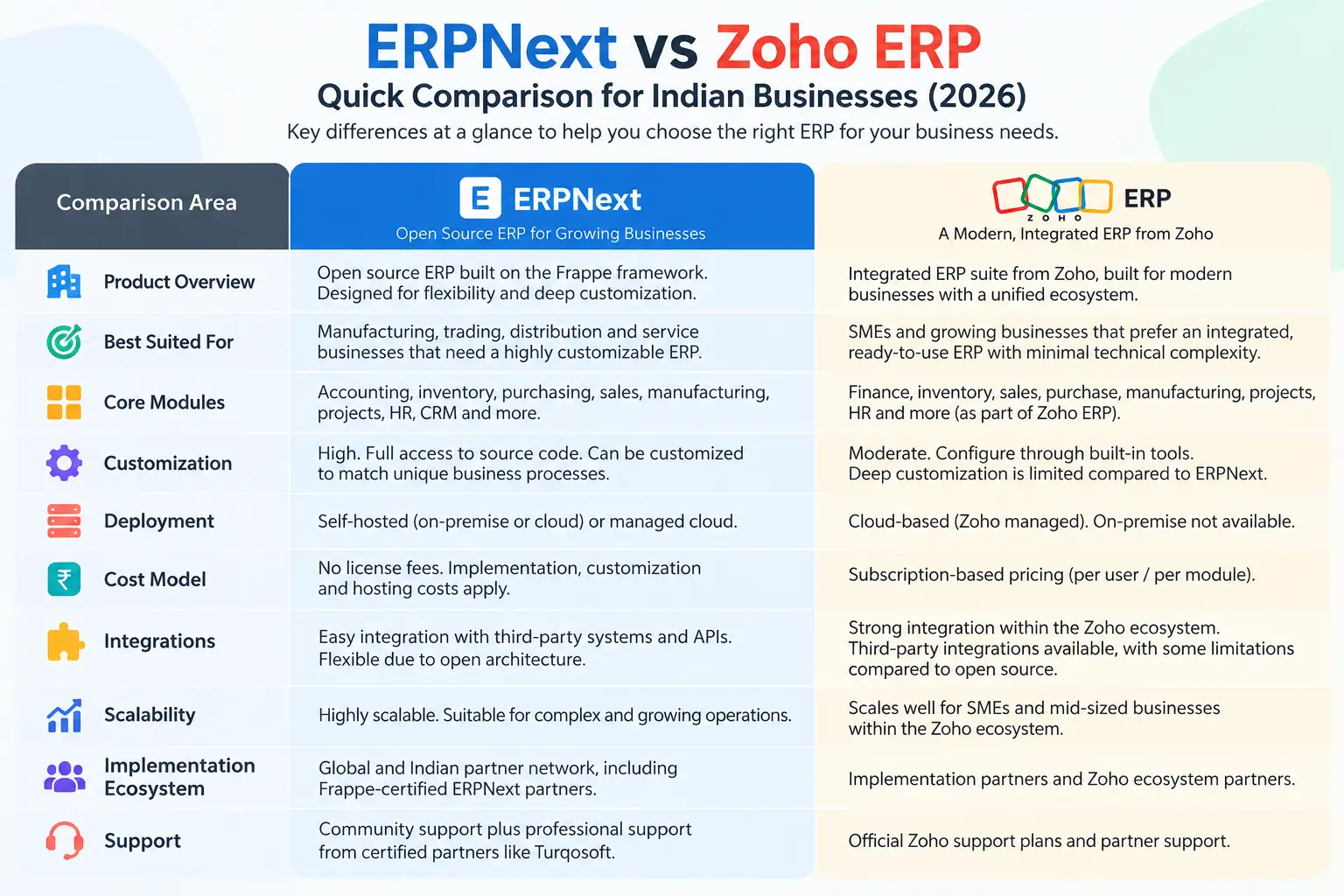
| Area | ERPNext | Zoho ERP |
| Product model | Open-source ERP | Proprietary cloud ERP |
| Deployment | Can be self-hosted or hosted through a provider | Zoho-managed cloud service |
| Software pricing | ERPNext software itself is open source; hosting, implementation and support still carry costs | Per-user/employee subscription with additional paid options |
| Manufacturing | BOM, Production Plan, Work Order, Job Card, Workstation, quality and inventory integration | BOM, Manufacturing Order, Job Cards, Work Centers, Shopfloor and quality |
| Inventory | Warehouses, transfers, stock reservation, batches, serial numbers and related stock controls | Inventory and warehouse functionality integrated with the ERP |
| Indian compliance | ERPNext plus the India Compliance app for India-specific statutory functionality | India-specific tax and compliance functionality within Zoho ERP |
| Customization | Configuration plus Frappe-based development/custom applications | Configuration, custom fields/functions/modules, workflows, webhooks and APIs |
| Infrastructure responsibility | Depends on deployment model | Primarily managed by Zoho |
| Implementation | Can be implemented internally or with Frappe/ERPNext partners | Zoho implementation model and partner/implementation assistance |
ERPNext is released under GPLv3 and its source code can be inspected and modified. Frappe also makes clear that while the software itself is free and open source, hosting, implementation, support and related services can carry costs. Frappe Docs
Zoho ERP follows a subscription model. At the time of writing, its India pricing page lists Standard at ₹999 per user/month billed annually and Premium at ₹2,499 per user/month billed annually, with a minimum of five users. Employee pricing and some add-ons are separate. These are published software prices and can change, so buyers should verify them directly before making a cost comparison. Zoho
First, Which Zoho Product Are You Comparing With ERPNext?
This is worth settling before comparing features.
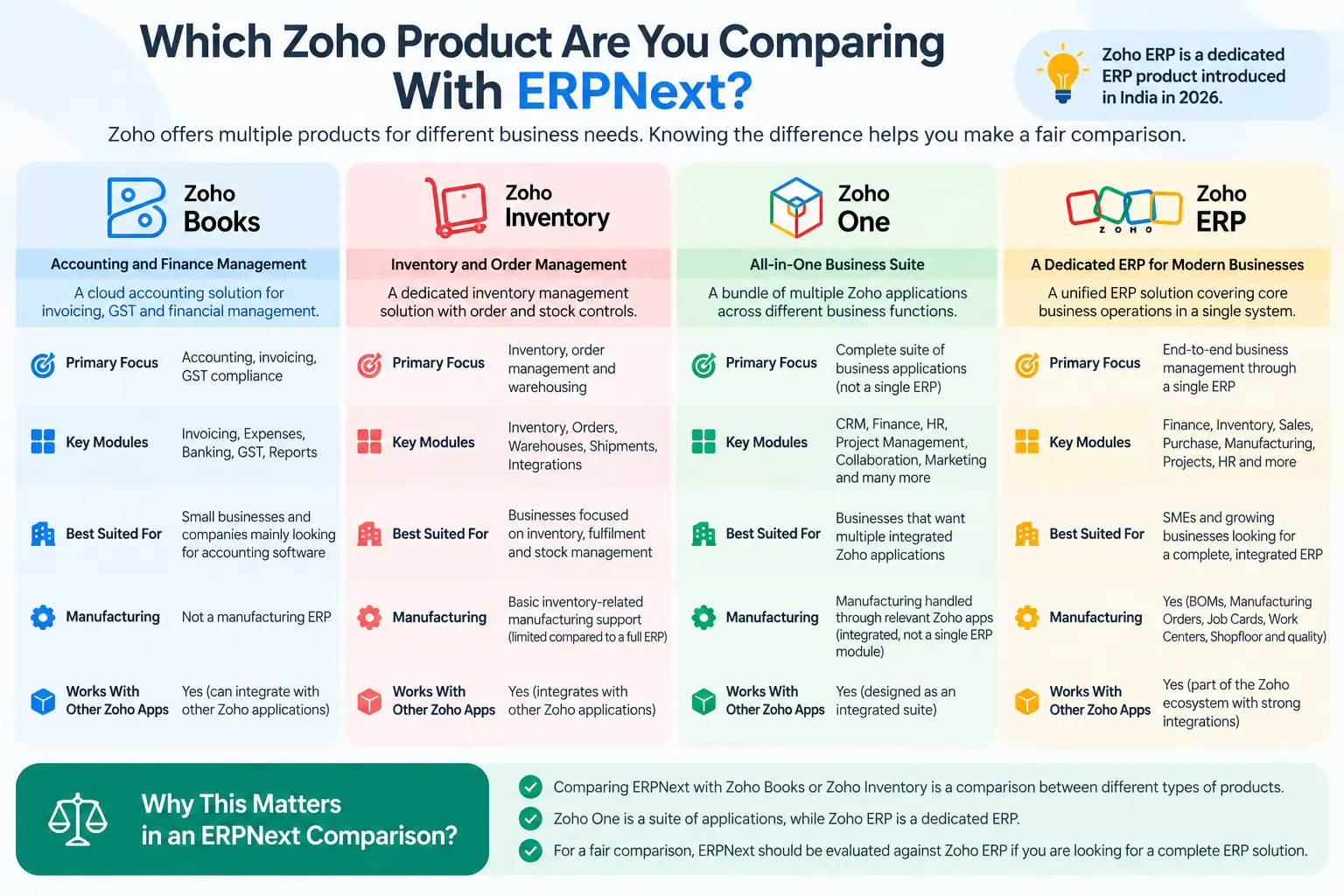
Zoho Books
Zoho Books is primarily an accounting platform. A business evaluating accounting, invoicing, GST and financial management may legitimately compare Zoho Books with the accounting capabilities available within ERPNext.
But that is not the same as comparing two complete ERP implementations.
Zoho Inventory
Zoho Inventory addresses inventory and order-management requirements. It may be relevant for businesses focused mainly on stock, fulfilment and related operations.
Again, ERPNext vs Zoho Inventory is a narrower comparison than ERPNext vs Zoho ERP.
Zoho One
Zoho One brings together a suite of Zoho business applications. Businesses may use combinations of CRM, finance, collaboration, HR and other applications depending on their requirements.
That creates a different architecture and implementation discussion from a dedicated ERP comparison.
Zoho ERP
Zoho ERP is now the more relevant comparison for businesses looking for a full ERP.
Zoho formally introduced the product in India on January 23, 2026. Its current feature set includes finance, inventory, manufacturing, quality, tax and other operational capabilities. Zoho
This also means some older ERPNext vs Zoho comparisons need to be read carefully. Claims made when Zoho’s offering was centred on Books, Inventory or its broader application suite may no longer describe Zoho ERP accurately.
ERPNext and Zoho ERP Follow Different Product Models
The distinction between open-source and proprietary software matters, but not because one approach is automatically preferable.
ERPNext and Frappe
ERPNext is open-source software built on the Frappe Framework. Its GPLv3 licence allows the source code to be used, inspected and modified. Frappe Docs
That creates several deployment possibilities. A company can self-host, use managed hosting, or work with an ERPNext/Frappe service provider.
The flexibility also creates responsibility.
A company choosing to manage its own environment needs the technical capability to handle matters such as server configuration, backups, upgrades, monitoring and troubleshooting. Frappe itself makes this distinction in its hosting guidance. Frappe
Zoho ERP
Zoho ERP follows a proprietary SaaS model. The infrastructure and product platform are managed within Zoho’s environment, while customers subscribe based on the applicable plan and users/employees.
Its current pricing also lists paid add-ons for areas such as additional locations and additional API capacity. Zoho
For an ERP buyer, the architectural question should therefore become practical: Who do we want to be responsible for the underlying system, how much control do we need over it, and how much business-specific development do we expect?
Those answers matter more than the labels “open source” and “SaaS.”
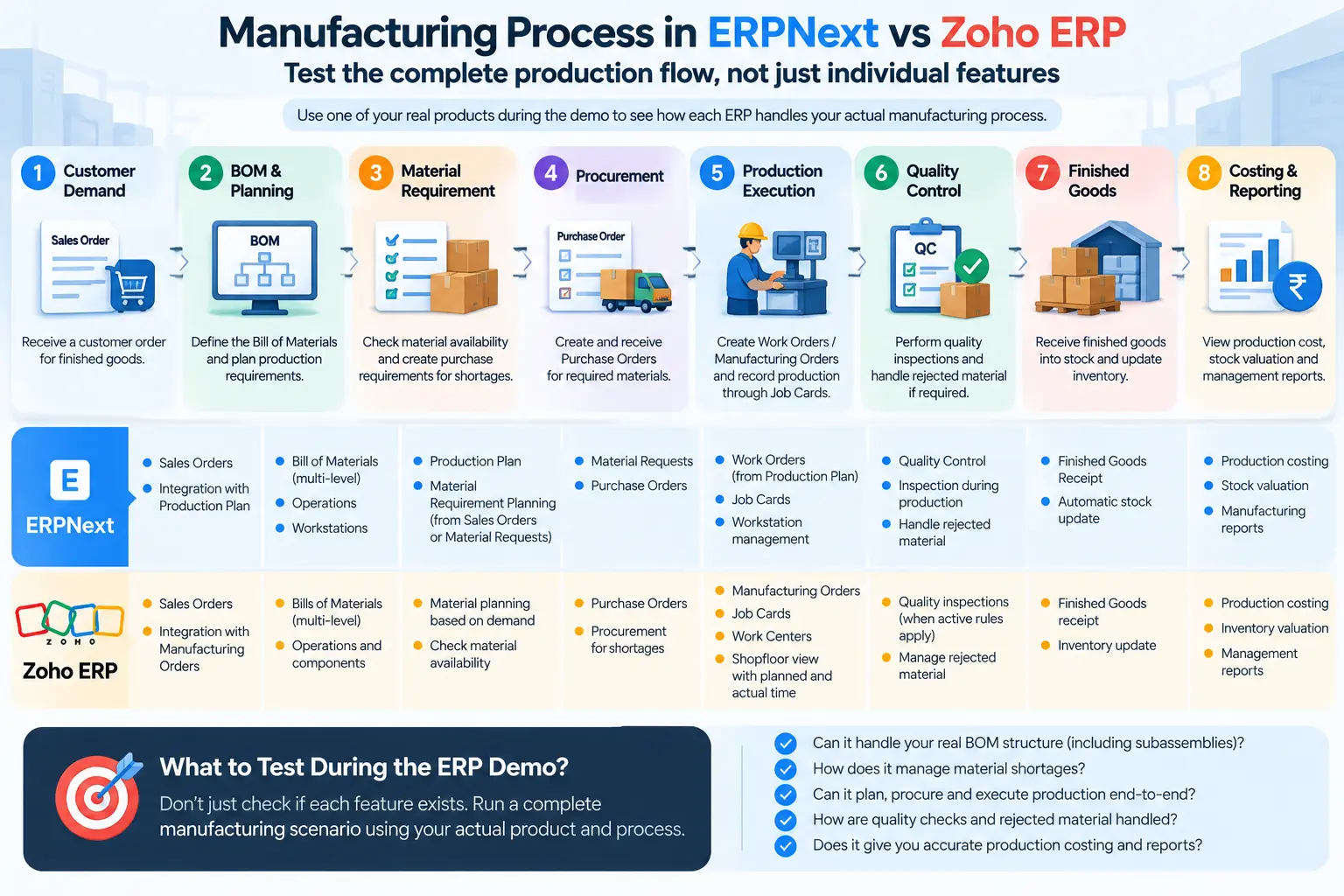
Manufacturing: Compare the Actual Production Flow
Manufacturing is where superficial ERP comparisons become particularly risky.
A checkbox saying “BOM — Yes” tells a manufacturer very little.
Consider a hypothetical company that receives an order for 100 finished units. Each unit requires subassemblies, purchased components and several operations.
The ERP needs to help answer questions such as:
- What needs to be manufactured?
- Which materials are required?
- What is already available?
- What needs to be purchased?
- Which operations need to happen?
- Where will those operations happen?
- How will actual production activity be recorded?
- How will quality be checked?
- How will the resulting production cost be understood?
That is the process worth comparing.
BOMs and product structure
In ERPNext, the Bill of Materials defines the materials/components required for production and can work with operations, Workstations, Work Orders and production planning. ERPNext’s manufacturing documentation also covers inventory integration for raw materials, work-in-progress and finished goods. Frappe Docs
Zoho ERP now has a dedicated manufacturing module containing Bills of Materials, Manufacturing Orders, Job Cards and Shopfloor functionality. Operations can be associated with components during BOM creation. Zoho
For manufacturers with multi-level products, don’t stop at asking whether both systems support BOMs.
Use one of your real products during the demonstration.
Production and material planning
ERPNext’s Production Plan can take requirements from Sales Orders or Material Requests, consolidate production requirements and plan raw-material procurement. Once submitted, it can be used to create Work Orders and Material Requests, including handling subassembly requirements. Frappe Docs
That connection matters because material planning is not an isolated calculation.
A useful ERP evaluation should follow demand through: Customer Demand → Production Requirement → BOM → Material Availability → Procurement → Production → Finished Goods
Ask both vendors to demonstrate that flow using realistic quantities and shortages.
Work Orders, Manufacturing Orders and Job Cards
ERPNext uses a Work Order to authorize production of a particular quantity. The Work Order can originate from a Production Plan and uses the BOM to determine material requirements. Frappe Docs
Operations can then be executed and tracked through Job Cards. ERPNext records actual production information for an operation performed at a Workstation through the Job Card. Frappe Docs
Zoho ERP uses Manufacturing Orders. Confirmed Manufacturing Orders can release Job Cards for individual operations, allocate them to Work Centers and record actual execution time. Zoho
Zoho’s current Work Center configuration also includes capacity plus setup and cleanup time, while its Shopfloor view displays jobs by Work Center with planned and actual time. Zoho
That is an important 2026 update. It would be inaccurate to evaluate the current Zoho ERP product as if Zoho only supported simple assembly.
Quality and production activity
Both products should be tested against your actual quality process rather than a generic “quality supported” requirement.
Zoho ERP’s current manufacturing workflow allows quality inspections to be initiated where active quality rules apply to manufacturing items. Zoho
ERPNext’s manufacturing module similarly includes quality control alongside production, Workstations, Job Cards and inventory. Frappe Docs
For a manufacturer, the demo should therefore include a failure scenario as well as a normal production run.
What happens when material is rejected? What happens when actual operation time exceeds planned time? What if production consumes more material than expected?
Those situations reveal far more about ERP fit than a polished happy-path demonstration.
Inventory, Warehouses and Distribution
Manufacturing is only one side of the comparison.
For distributors, dealers, trading businesses and companies operating several locations, inventory can be the more important evaluation area.
ERPNext supports warehouse-based inventory, stock transfers, serial and batch tracking and stock reservation. For example, stock can be reserved against Sales Orders, while batch tracking can carry expiry information and follow batches through stock transactions. Frappe Docs
But once again, don’t evaluate inventory using a checklist.
Consider this scenario: Branch A receives a customer order but does not have enough stock. Branch B has the item. Another quantity is already expected from a supplier.
During each ERP demonstration, ask:
- What quantity can Sales see as available?
- Can Sales distinguish available stock from committed or reserved stock?
- Can another warehouse fulfil the requirement?
- How is an inter-location transfer handled?
- Can purchasing see the incoming requirement?
- How does the resulting stock movement affect accounting?
- Can management see the complete position without combining reports manually?
For businesses with several branches, this scenario can expose important differences in how inventory is structured and controlled.
Accounting, GST and Indian Business Requirements
Indian ERP buyers also need to examine how statutory requirements fit into normal transactions.
There is an important architectural distinction here.
For ERPNext, India-specific statutory functionality is provided through the India Compliance app, which extends ERPNext with GST, e-Invoicing, e-Way Bills, TDS, TCS and related India-specific requirements. It should therefore be described as part of the Frappe ecosystem rather than implying that every India-specific feature belongs to ERPNext core. Frappe Docs
Zoho ERP’s India offering includes GST functionality, e-Invoicing, e-Way Bills, TDS and TCS. Its e-Invoicing documentation, for example, covers connecting with India’s Invoice Registration Portal and obtaining IRNs and QR codes. Zoho
For an ERP buyer, however, statutory compliance should not be evaluated independently from operations.
Take a normal sale.
The more useful question is whether the business can move through: Order → Stock/Production → Delivery → Invoice → Tax Compliance → Accounting → Receivables
without repeatedly recreating or reconciling the same transaction elsewhere.
For businesses operating under several GST registrations or locations, test those scenarios specifically during evaluation rather than assuming that a generic GST demonstration covers your organizational structure.
Customization and Integration: How Far Does Your Business Need to Go?
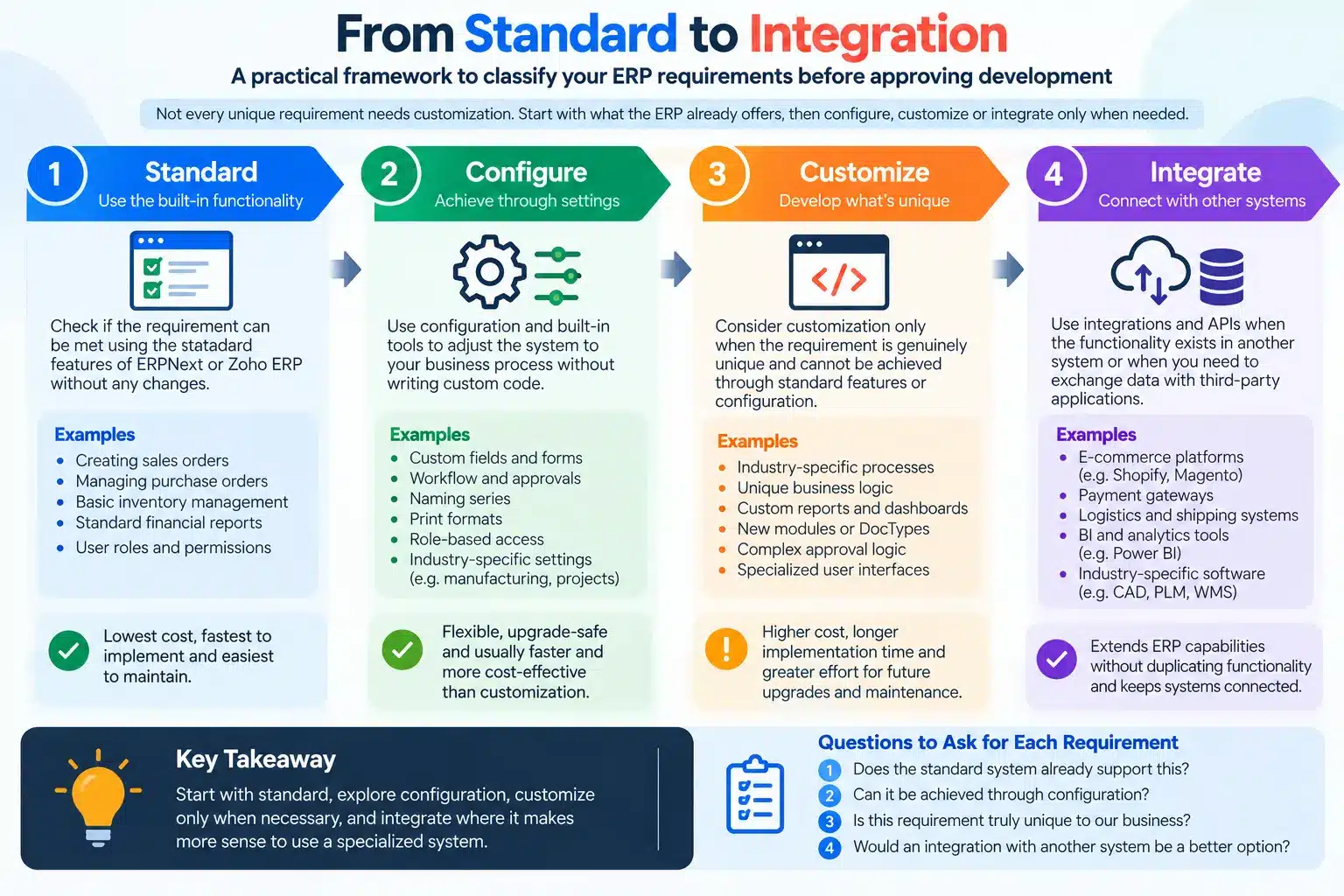
Almost every ERP project eventually encounters a requirement that does not match the standard software exactly.
The first response should not automatically be custom development.
A practical sequence is: Standard → Configure → Customize → Integrate
Start with the standard system. If the requirement can be handled through settings, roles, workflows or other configuration, use that approach.
If a genuine process gap remains, determine whether customization is justified.
Integration is a separate question. A business may need ERP to exchange information with an e-commerce platform, bank, logistics provider, production system or another application even when the ERP process itself requires no customization.
ERPNext’s open-source model and Frappe Framework allow businesses to extend the system and develop applications where required.
Zoho ERP also provides customization options. Its current plans list custom fields, validation rules, schedulers, custom buttons, custom functions, webhooks, custom reports, workflows and custom modules, with plan-specific limits. Zoho
So asking “Which ERP is customizable?” is not particularly useful.
Ask instead: Which of our requirements can be handled as standard, which need configuration, which genuinely require custom development, and which require another system to be integrated?
That question can prevent a surprising amount of unnecessary development.
ERPNext vs Zoho ERP Pricing: Compare Total Cost, Not Just Subscription
Price comparisons become misleading when software licence cost is treated as the total ERP project cost.
ERPNext cost structure
ERPNext is free and open-source software. That does not make an ERPNext implementation cost-free.
Depending on the deployment and project, costs may include:
- hosting
- requirements analysis and consulting
- configuration
- data migration
- customization
- integration
- user training
- support
- technical maintenance
- upgrade testing
A company that self-hosts may avoid a particular managed-hosting subscription, but it also takes responsibility for infrastructure and administration.
Zoho ERP subscription
As of September 2026, Zoho’s published India pricing is:
| Plan | Annual billing | Monthly billing |
| Standard | ₹999/user/month | ₹1,399/user/month |
| Premium | ₹2,499/user/month | ₹2,999/user/month |
Zoho currently lists a minimum of five users. Its pricing page also lists employee charges and paid add-ons such as additional locations and additional API capacity. Prices are stated as exclusive of GST and per organization. Zoho
These prices should be rechecked whenever this article is updated.
Build a three-year cost model
Instead of comparing one ERPNext hosting bill with one Zoho subscription, calculate: Software/subscription + hosting + implementation + migration + customization + integrations + support + internal effort + ongoing technical requirements
Then model the cost over three years using your expected number of users, locations and integrations.
A ₹999-per-user subscription and open-source software cannot be meaningfully compared until the implementation requirements around them are known.
Implementation Can Matter More Than the Feature Comparison
Suppose both systems can create a Purchase Order.
That tells you very little about whether either system will work well for your company.
You still need to decide:
- Where does the purchase requirement originate?
- Who approves it?
- Is it based on stock, production demand or a manual request?
- How are supplier quotations handled?
- What happens when goods arrive partially?
- What happens when material fails inspection?
- How does the transaction reach accounts?
- Which reports should management see afterwards?
Those are implementation questions.
Requirements discovery
Before finalizing an ERP, map the important business processes and exceptions.
For manufacturing, that may include Sales, Purchase, Stores, Production, Quality and Finance.
For distribution, it could include pricing, customer credit, multiple warehouses, transfers, returns and procurement planning.
Then demonstrate those processes in both systems.
Data migration
Don’t treat migration as an instruction to “move everything.”
Determine what actually needs to enter the new ERP:
- customers and suppliers
- item masters
- warehouses
- BOMs
- opening inventory
- outstanding receivables and payables
- financial opening balances
- relevant historical information
Data also needs cleaning and validation before migration.
For example, ERPNext treats opening stock differently depending on whether inventory is serialized or batch-controlled, which illustrates why migration planning must consider the structure of the target system rather than simply importing spreadsheets. Frappe Docs
User Acceptance Testing
UAT should follow real business scenarios.
Don’t simply give users access and ask them to “test the ERP.”
Have Sales enter a real type of order. Let planning process it. Introduce a material shortage. Receive part of a purchase. Execute production. Perform quality checks. Dispatch the goods. Invoice the customer. Record the financial effect.
Also test what goes wrong.
Those exception scenarios often reveal more than the standard process.
ERPNext or Zoho ERP? Start With Your Business Scenario
There is no useful universal answer to ERPNext or Zoho ERP?
The requirements of a professional-services company are different from those of a manufacturer running multi-level production.
Use your operating model to determine what deserves the most attention.
| Business | Requirements worth testing |
| Services | CRM, project/service management, billing, expenses, accounting and reporting |
| Trading | Purchasing, pricing, inventory, order fulfilment, credit and accounting |
| Distribution | Multi-warehouse inventory, transfers, procurement, pricing, returns, credit and stock visibility |
| Manufacturing | BOMs, material planning, production, shop-floor execution, quality, subcontracting and costing |
| Multi-location operations | Company/location structure, warehouses, permissions, inter-location transactions and consolidated reporting |
Don’t ask vendors to demonstrate all 200 things their product can do.
Give them five or six situations your company actually struggles with and ask them to show exactly how those situations would work.
That creates a much more useful comparison.
10 Things to Test During ERPNext and Zoho ERP Demos
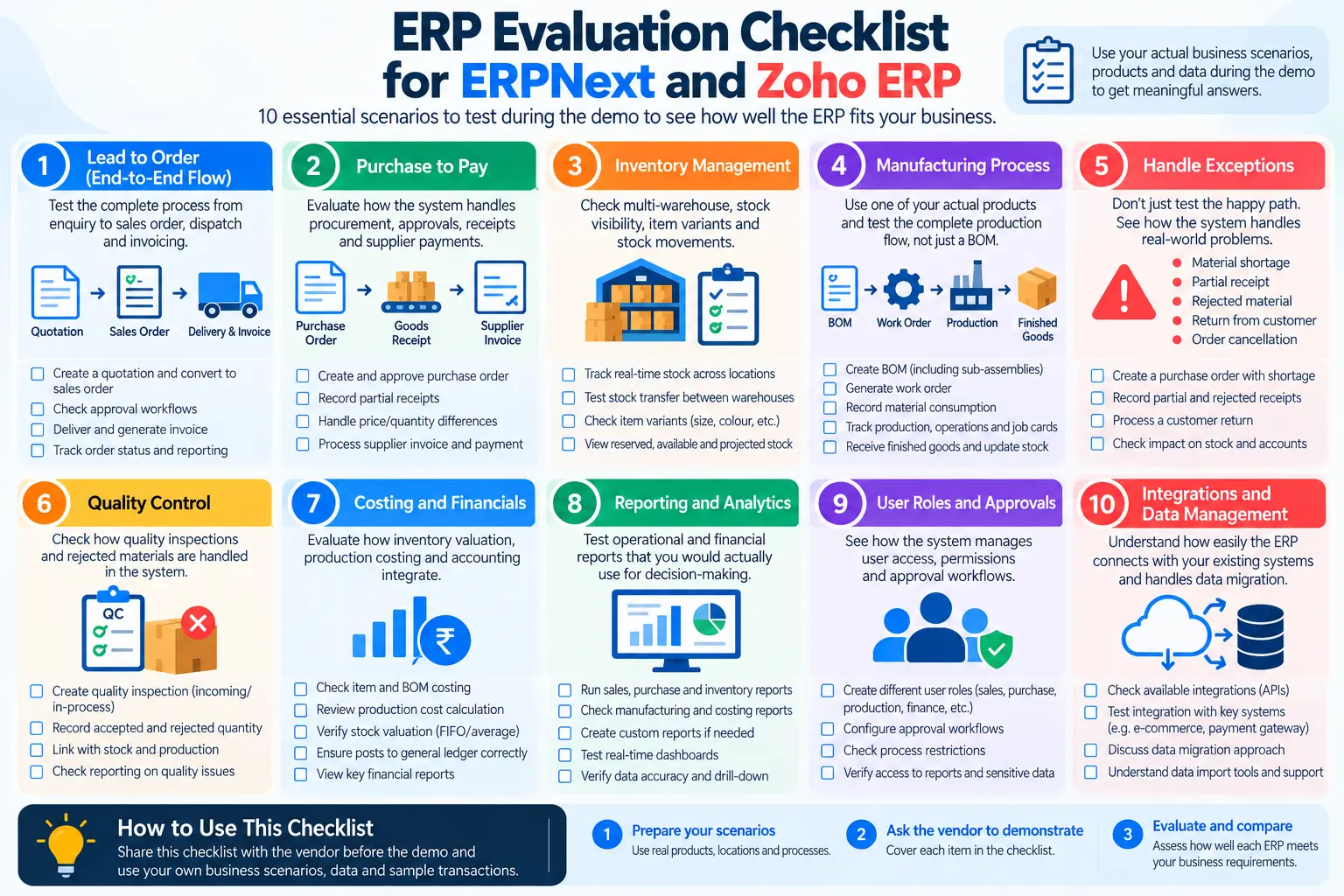
A software demonstration should help you test assumptions rather than simply introduce screens.
Use these ten scenarios:
- Complete one order-to-cash cycle. Start with an actual type of customer order and follow it through delivery, invoicing and payment.
- Run purchase-to-pay. Include approval, receipt, supplier invoice and payment.
- Create an inventory shortage. See what the user knows and what the system recommends or enables next.
- Transfer stock between locations. Test the complete transaction, including the financial and inventory impact where relevant.
- Manufacture a real product. If you manufacture, use an actual representative BOM and operations rather than a sample product supplied by the vendor.
- Introduce an exception. Try a partial delivery, rejected material, customer return or quantity change.
- Test your approval hierarchy. Use the approval levels your organization actually requires.
- Recreate a management report. Pick one report your team currently spends time preparing manually.
- Discuss one real integration. Ask how data will move, who owns the integration and what happens when it fails.
- Test an accounting/month-end scenario. Finance should be part of the evaluation, not invited only after operations have selected the ERP.
Choosing Between ERPNext and Zoho ERP
The most useful outcome of an ERPNext vs Zoho comparison is not a winner.
It is a clearer set of requirements.
Zoho ERP’s arrival in 2026 means buyers now have another full ERP option to evaluate in India. ERPNext brings a mature open-source ERP and Frappe ecosystem; Zoho ERP brings a proprietary cloud ERP within the wider Zoho ecosystem. Both deserve to be evaluated based on what they can do with your actual processes rather than assumptions inherited from older product comparisons.
Before making the decision, document a handful of processes that matter most to your company. Include the difficult ones—the production shortage, partial supplier delivery, inter-branch transfer, quality rejection, approval exception or report that currently requires manual work.
Then ask both systems to handle them.
If your evaluation is moving toward ERPNext but you’re unsure which requirements are standard, configurable, custom or integration-dependent, Turqosoft Solutions Pvt. Ltd. can conduct an ERPNext requirement and fit assessment before you finalize the implementation scope. You can reach us via email at info@turqosoft.com or give us a call at +91 9841205845. Or, stay connected with us on LinkedIn, Facebook, Twitter, or Instagram for exciting updates on ERPNext and other relevant topics.
For businesses already past product selection, the next useful step is understanding the ERPNext implementation process, data migration, UAT, training, go-live and ongoing support before committing to a project.