
ERPNext for Manufacturing Companies: From BOM & MRP to Production, Inventory & Costing
ERPNext for Manufacturing Companies: From BOM & MRP to Production, Inventory & Costing
 admin
admin
A customer order comes in. Sales knows what has been promised and when it needs to be delivered. Production needs to know what to manufacture. Purchase needs to know which materials are short. Stores needs to know what is available. Management wants to know whether the order can be delivered on time and what it will actually cost to produce.
In many manufacturing companies, those answers are spread across accounting software, Excel sheets, production registers, messages and the knowledge of individual employees.
The problem is not simply recording production. It is connecting customer demand, material requirements, procurement, inventory, shop-floor activity, quality, finished goods and costing into a process that everyone can work from.
That is the problem ERPNext for manufacturing companies is designed to address.
ERPNext for Manufacturing Companies: BOM, MRP & Costing
ERPNext’s Manufacturing module includes Bills of Materials (BOMs), Production Plans, Work Orders, Job Cards, Workstations, production planning, quality controls, inventory integration and manufacturing reports. But a list of features does not tell a manufacturer whether ERPNext will fit its factory.
A better question is: Can ERPNext support the way your company plans, manufactures, tracks and costs its products—and what needs to be in place for it to work properly?
That is what this guide examines.
Is ERPNext a Good Fit for Manufacturing Companies?
ERPNext can support a broad range of manufacturing processes, particularly where production can be defined through items, BOMs, operations, Workstations, material movements and Work Orders.
The official ERPNext manufacturing documentation describes an integrated model covering BOMs, Workstations, Job Cards, Work Orders, production planning, quality control, inventory and reporting. ERPNext also supports multi-level BOMs, allowing a finished product to contain manufactured subassemblies that have their own BOMs. (Frappe Documentation)
That makes it relevant to manufacturers dealing with scenarios such as assembly production, multi-stage manufacturing, make-to-order production, make-to-stock production, outsourced processes and products requiring batch or serial traceability.
Consider a manufacturer producing electrical control panels. A finished panel may contain an enclosure assembly, busbar assembly, breakers, meters, wiring and other components. Some components are purchased, while others may be produced internally or outsourced.
ERPNext can represent that structure using BOMs and subassemblies, plan the required materials, create production activity through Work Orders and record operations through Job Cards.
But manufacturing suitability should never be decided from a feature checklist alone.
A company with highly specialized finite scheduling, machine-data acquisition, CAD/PLM integration, industry-specific compliance processes or unusual shop-floor requirements should evaluate those requirements individually. Some may be handled through standard ERPNext functionality or configuration; others may require another Frappe application, integration or custom development.
A useful ERP evaluation therefore starts with the manufacturing process—not with the software demo.
| Manufacturing characteristic | What to evaluate in ERPNext |
| Multi-level assemblies | BOM and subassembly structure |
| Multiple production operations | Operations, Routing, Workstations and Job Cards |
| Outsourced manufacturing | Subcontracting process |
| Batch-produced goods | Batch and quality requirements |
| Serialized equipment | Serial-number traceability |
| Multiple warehouses | Raw material, WIP and finished-goods warehouse structure |
| Machine-generated production data | Integration requirements |
| Specialized production planning | Scheduling and capacity requirements |
The objective is not to prove that ERPNext can do everything. It is to establish what is standard, what needs configuration, what genuinely needs customization and what may require integration.
How ERPNext Connects the Manufacturing Process
Manufacturing rarely begins at the shop floor.
It often begins with demand.
A Sales Order may create a requirement for a finished product. A make-to-stock company may plan production based on internal material requirements or forecast-driven planning. Production then needs materials; materials may need to be purchased; production consumes stock; completed products return to inventory; and those products are eventually delivered and invoiced.
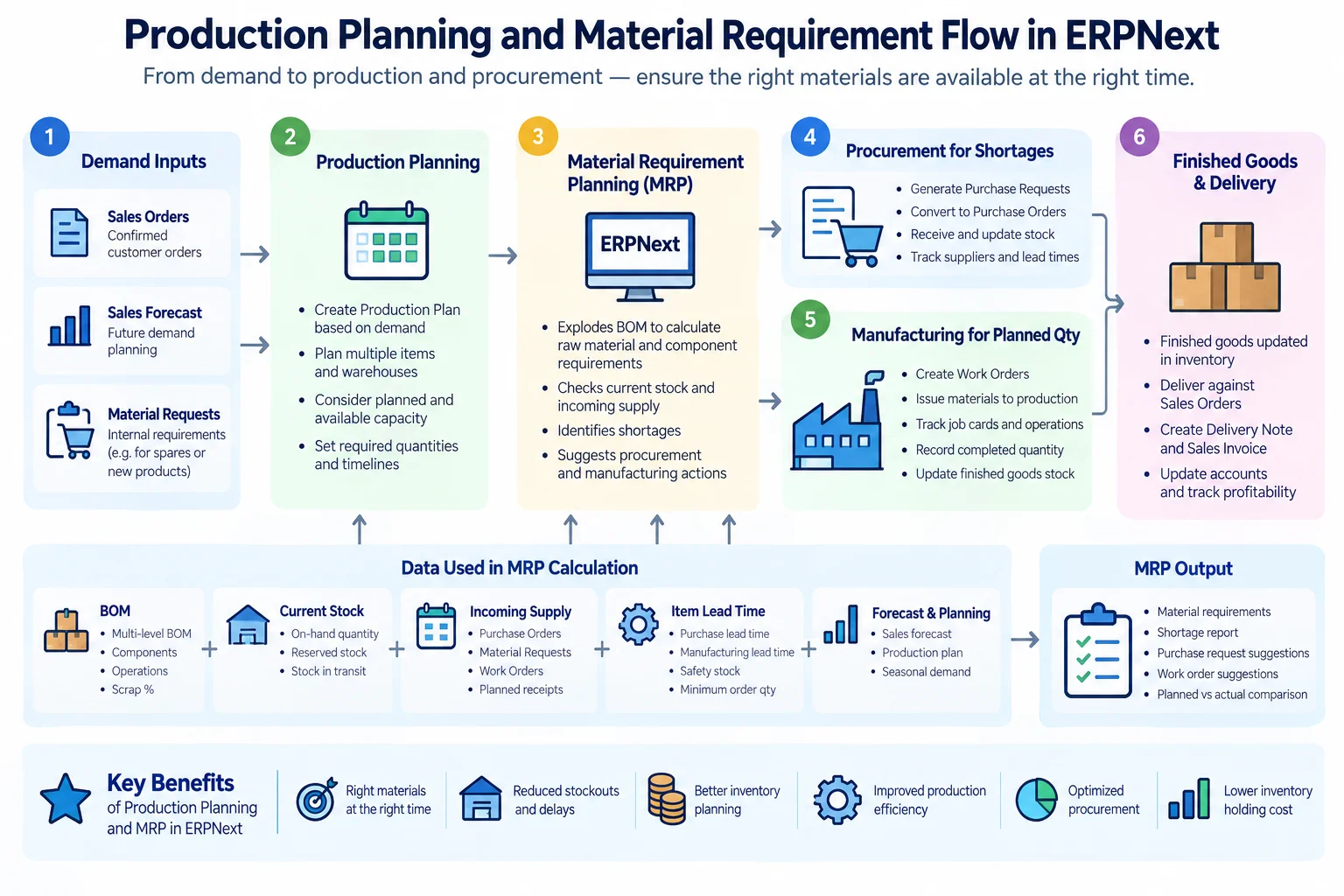
ERPNext’s Production Plan can plan manufactured items against Sales Orders or Material Requests and can also calculate raw-material requirements for the planned finished goods. A Work Order then acts as the shop-floor instruction to manufacture a defined quantity of an item. (Frappe Documentation)
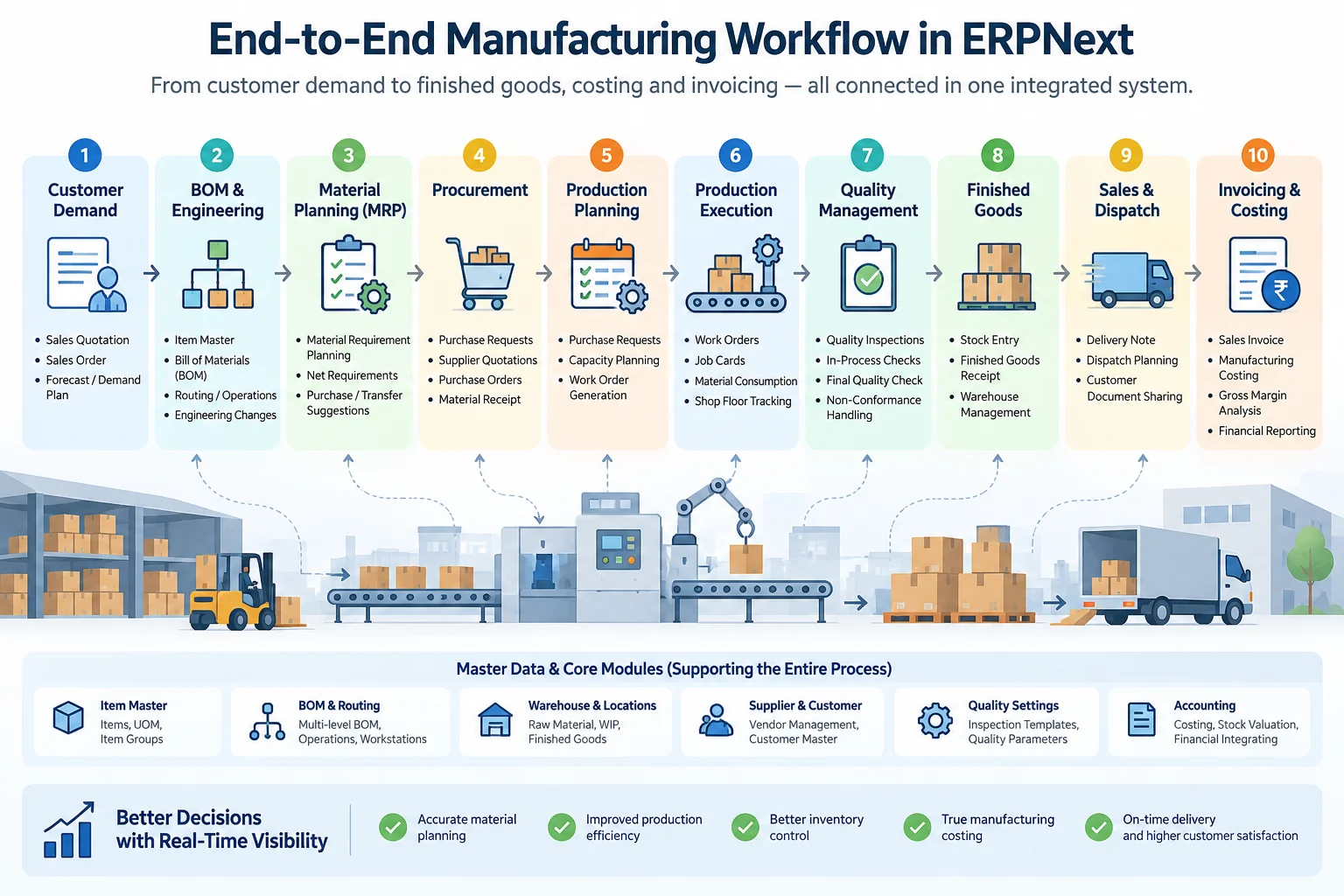
Conceptually, the connected process can look like this:
Customer Demand / Internal Requirement
↓
Production Planning
↓
Material Requirement Planning
↓
Procurement where material is short
↓
BOM + Operations
↓
Work Order
↓
Material Transfer / Consumption
↓
Job Cards and Shop-Floor Operations
↓
Quality Controls
↓
Finished Goods
↓
Delivery and Invoicing
↓
Inventory and Cost Visibility
The exact document flow will vary with the manufacturer’s operating model. A make-to-order engineering business should not be forced into exactly the same planning process as a manufacturer replenishing standard products for stock.
What matters is the connection between the functions.
If production planning changes but purchasing never sees the revised requirement, the ERP has not solved the planning problem. If operators consume additional material but nobody records it, the cost data becomes unreliable. If finished goods are reported without recording actual production activity, management sees completion without understanding what happened on the shop floor.
An integrated ERP is valuable because these activities can form part of the same operational record.
BOM: Building the Foundation of Manufacturing in ERPNext
A Bill of Materials answers a basic manufacturing question:
What goes into making this product?
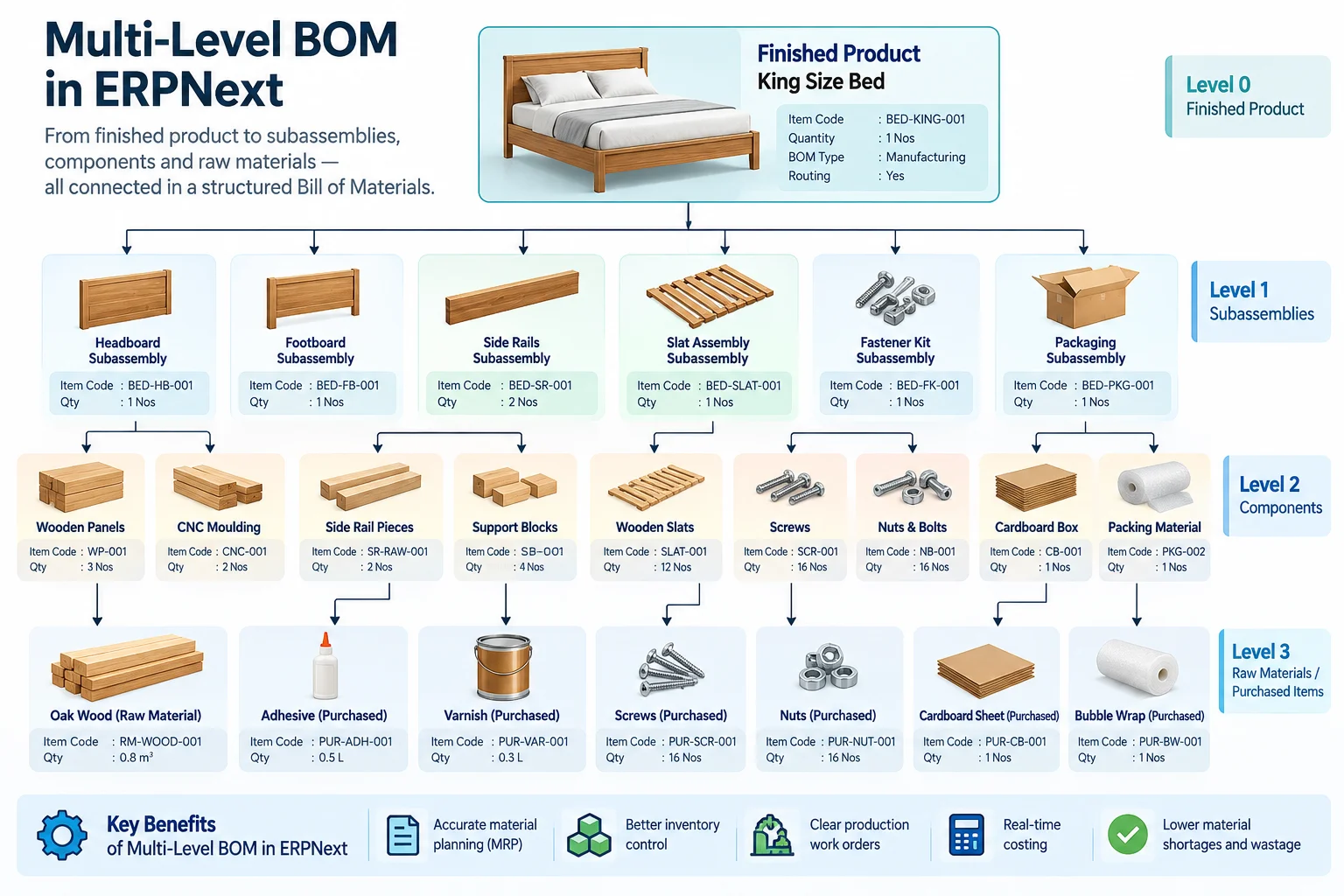
In ERPNext, a BOM contains the materials and quantities required to manufacture an item and can also include the operations involved in producing it. ERPNext supports multi-level BOMs, where manufactured subassemblies can have BOMs of their own. (Frappe Documentation)
Imagine a company manufacturing an industrial pump.
The finished pump could require:
- Pump assembly
- Motor
- Coupling
- Base frame
- Fasteners
- Packaging
The pump assembly could itself require a casing, shaft, impeller, bearings and seals.
That creates a BOM hierarchy rather than a flat material list.
Why BOM accuracy matters beyond production
A BOM is not merely a production recipe.
It influences material planning. Material planning influences procurement. Material consumption affects inventory. Materials and operations influence production cost.
The chain is therefore closer to: BOM → Material Requirement → Procurement → Production → Consumption → Cost
If the BOM says a product requires four units of a component when the actual requirement is five, the problem does not remain inside the BOM.
Planning may underestimate requirements. Purchasing may order too little. Production may encounter a shortage. Additional material may have to be issued. The difference between planned and actual cost may then require explanation.
ERPNext’s own documentation describes the BOM as being at the heart of its manufacturing system and notes that maintaining correct BOMs is important for accurate purchase requirements. (Frappe Documentation)
BOM readiness before implementation
Before loading hundreds or thousands of BOMs into an ERP, a manufacturer should establish:
- Are item codes standardized?
- Are units of measure correct?
- Are quantities reliable?
- Which items are purchased and which are manufactured?
- Which products contain subassemblies?
- Are production operations defined?
- Are Workstations identified?
- Are alternative materials or alternate BOMs required?
- How is scrap handled?
- Who owns BOM creation and revision?
ERPNext does not eliminate the need for accurate manufacturing data. It makes the effect of that data much more visible.
Production Planning and MRP: What Should We Manufacture and Purchase?
Once the product structure is defined, the next question is demand.
What needs to be manufactured, in what quantity, and what materials are required to make it?
ERPNext’s Production Plan is designed for production and material planning. It can plan manufacturing against multiple Sales Orders or Material Requests and determine material requirements based on the finished products being planned. (Frappe Documentation)
This is where ERP begins to replace disconnected production spreadsheets with linked planning information.
Production Plan vs Work Order
These documents solve different problems.
A Production Plan deals with planning: what needs to be manufactured and what materials will be required.
A Work Order deals with execution: manufacture a particular quantity of a particular item.
ERPNext describes a Work Order as the document given to the manufacturing shop floor as the signal to manufacture a specified quantity. Work Orders can be generated from Production Plans. (Frappe Documentation)
That distinction matters.
A manufacturer may need to plan demand across several Sales Orders before deciding how many Work Orders to release to production.
Material requirements are more than BOM quantity
A common mistake is to think MRP means: Order quantity × BOM quantity = purchase quantity.
Real material planning also needs to consider what is already available or expected.
ERPNext uses stock and requirement information to help identify material needs, and its manufacturing planning tools can generate Material Requests for required raw materials. (Frappe Documentation)
For a simplified illustration, suppose a manufacturer plans 100 finished units and each requires four units of Component A.
Gross requirement = 400 units.
If sufficient usable Component A is already available or expected for that requirement, purchasing should not blindly buy another 400 units. Planning needs to consider the relevant stock and supply position.
The actual ERPNext calculation should be relied upon rather than recreating it in an external spreadsheet.
Why MRP can fail even when the calculation is correct
Planning output is only as dependable as the information behind it.
Problems often originate in:
- Incorrect BOM quantities
- Inaccurate inventory
- Wrong warehouse structure
- Poorly maintained lead times or planning inputs
- Materials consumed physically but not recorded
- Old or duplicate item masters
- Unrecorded production
- Planning processes that employees bypass
This is an important implementation lesson.
MRP is not a substitute for data discipline.
If the system says 500 components are available while the stores team can physically find only 350, a mathematically correct plan is still operationally wrong.
ERPNext v16 planning deserves particular attention
Current ERPNext documentation also describes the Production Plan Scheduler, which calculates start and end dates for finished goods, subassemblies and raw-material purchasing while considering machine capacity, working shifts, holidays and existing bookings. ERPNext also documents a Production Plan Visualizer that consolidates production progress, material availability, related Work Orders/Purchase Orders and scheduling information. (Frappe Documentation)
These are significant planning capabilities for manufacturers evaluating the current generation of ERPNext and should be assessed during a v16 implementation rather than assuming the planning experience is identical to older versions.
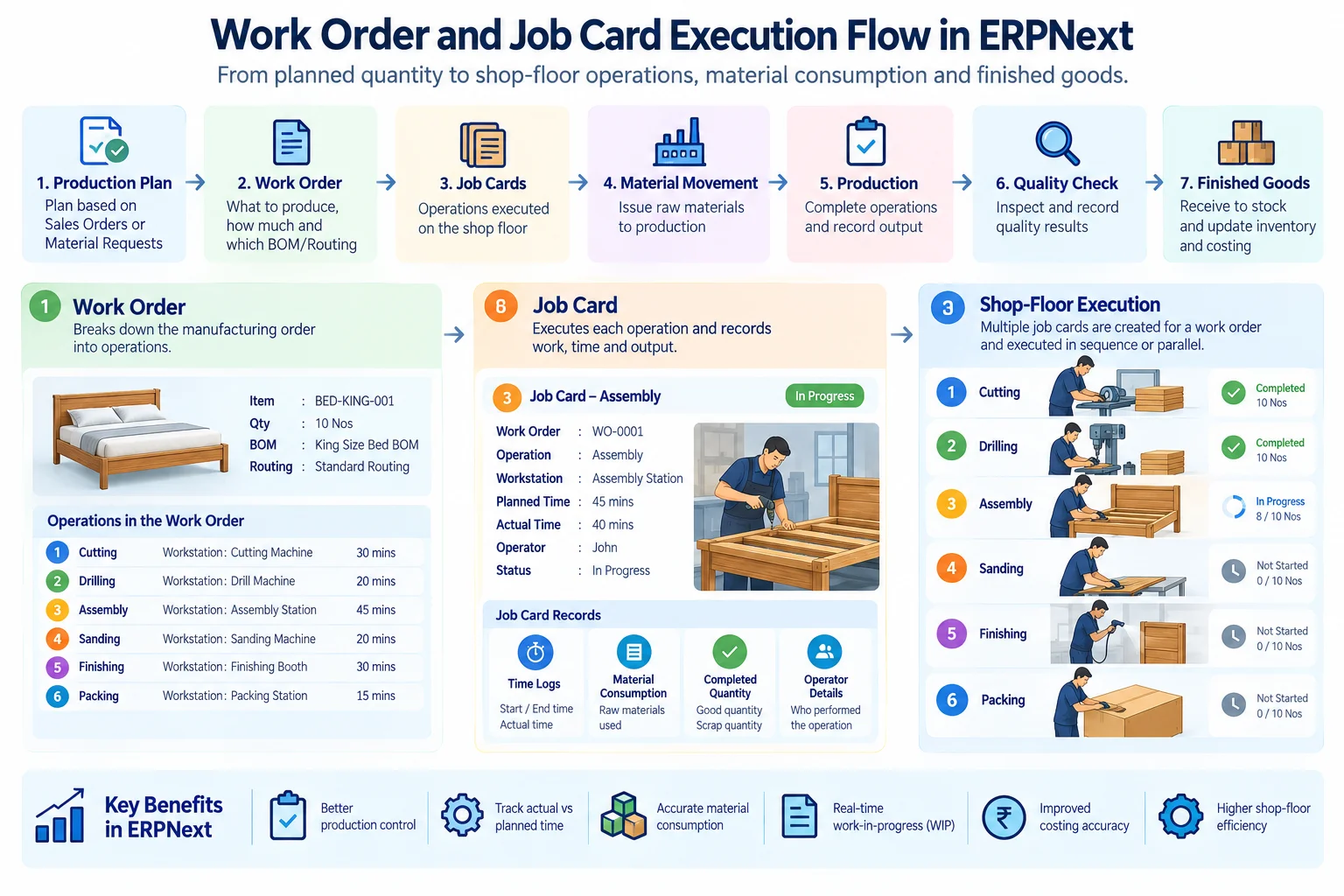
Work Orders, Job Cards and Shop-Floor Execution
Planning tells the company what should happen.
Shop-floor execution records what actually happens.
Work Orders
ERPNext defines the Work Order as the signal to manufacture a specific quantity of an item. The document works with the BOM and can generate material requirements for production. (Frappe Documentation)
For a manufacturer with operations, this provides the bridge between production planning and execution.
A Work Order can answer questions such as:
- What are we manufacturing?
- How much are we producing?
- Which BOM applies?
- Which operations are involved?
- What materials are required?
- How far has production progressed?
Job Cards
A Job Card goes deeper into an individual operation.
ERPNext describes it as storing actual production information for an operation performed at a Workstation. Job Cards are created from Work Orders and can record the employee, completed quantity and time taken for an operation. Completing Job Cards also contributes to tracking progress against the Work Order. (Frappe Documentation)
Consider a simplified production routing: Cutting → Machining → Assembly → Inspection → Packing
The Work Order represents the manufacturing job. Job Cards can provide the operational execution layer for the individual production stages.
That becomes valuable when management needs to know more than whether the finished item exists.
For example:
- Has machining started?
- Which operation is delayed?
- How much quantity has been completed?
- Which Workstation performed the operation?
- How much time was recorded?
ERPNext also allows Workstations to carry information such as working hours and operation costs, supporting capacity and costing processes. (Frappe Documentation)
Do not digitize unnecessary shop-floor complexity
An implementation can fail by demanding too much data from operators.
If employees previously recorded almost nothing, introducing a process requiring numerous fields and transactions at every production step can create resistance or inaccurate entries.
The design question should therefore be:
What shop-floor information does the business genuinely need to control production, trace activity and calculate useful costs?
Capture that reliably first. Add further detail where it creates measurable operational value.
Inventory, WIP and Actual Material Consumption
A BOM says what production is expected to consume.
The factory consumes what it actually uses.
That difference matters.
ERPNext supports material transfer and manufacturing Stock Entries associated with Work Orders. On completion, the finished-goods update can deduct materials/subassemblies from the WIP warehouse and add completed goods to the finished-goods warehouse. (Frappe Documentation)
For longer production cycles, ERPNext’s Manufacturing Settings also provide continuous material consumption, allowing materials to be consumed without simultaneously producing finished goods. The official documentation gives the example of a product that takes a month to manufacture while raw materials are consumed daily. (Frappe Documentation)
This is important for manufacturers where production is not a single instantaneous transaction.
Planned consumption vs actual consumption
Suppose the BOM requires 10 kg of material.
If production consistently consumes 10.8 kg, management has something worth investigating.
The difference could arise from:
- Process loss
- Scrap
- Material quality
- Machine settings
- Incorrect BOM quantity
- Handling loss
- Operator practice
ERP should make these differences visible, but the system cannot explain every variance automatically. That requires manufacturing analysis.
ERPNext Job Cards can also record scrap items generated during operations, allowing relevant scrap to be brought into inventory. (Frappe Documentation)
The implementation therefore needs to define how the company will treat normal process loss, recoverable scrap, defective material and additional consumption.
Quality, Batch and Serial Traceability
Producing the right quantity is only part of manufacturing control.
The company may also need to know whether material passed inspection, which batch went into a product, or which serialized unit was delivered to a particular customer.
ERPNext’s Manufacturing module integrates quality controls into production, and BOMs can be configured to require Quality Inspections for raw materials and finished goods. Job Cards can also support in-process quality inspection scenarios. (Frappe Documentation)
Batch and serial tracking solve different traceability problems.
A batch identifies a group or lot of items.
A serial number identifies an individual unit.
A cosmetics manufacturer, for example, may care heavily about batch identity and expiry-related traceability. An industrial equipment manufacturer may need to trace the exact serial number of a machine or component.
The correct setup depends on the product and the traceability obligation.
ERPNext should not, however, be presented as automatically making a manufacturer compliant with an industry regulation. Compliance depends on the complete process, controls, documentation and applicable regulatory requirements—not simply on having batch or serial functionality.
Subcontracting and Job Work
Many manufacturers do not perform every operation internally.
Heat treatment, coating, machining, fabrication, assembly, printing, packaging and other activities may be outsourced to suppliers.
ERPNext’s standard subcontracting model supports scenarios where the company supplies raw materials to a third-party supplier and the supplier performs the labour or production. (Frappe Documentation)
Conceptually: Company Materials → Subcontractor → Processing → Subcontracted/Finished Item → Company
That standard flow should be evaluated against the manufacturer’s real process.
More complicated situations deserve separate requirements analysis. Examples include a subcontractor determining additional materials only after inspection, serialized components being sent out, multiple subcontracting stages, or third parties adding materials that need special commercial treatment.
These scenarios should not automatically be labelled “customization.”
The right sequence is: Understand requirement → Map standard ERPNext → Identify configuration options → Identify genuine gap → Customize only if justified.
That approach protects the implementation from unnecessary custom development while still acknowledging real operational requirements.
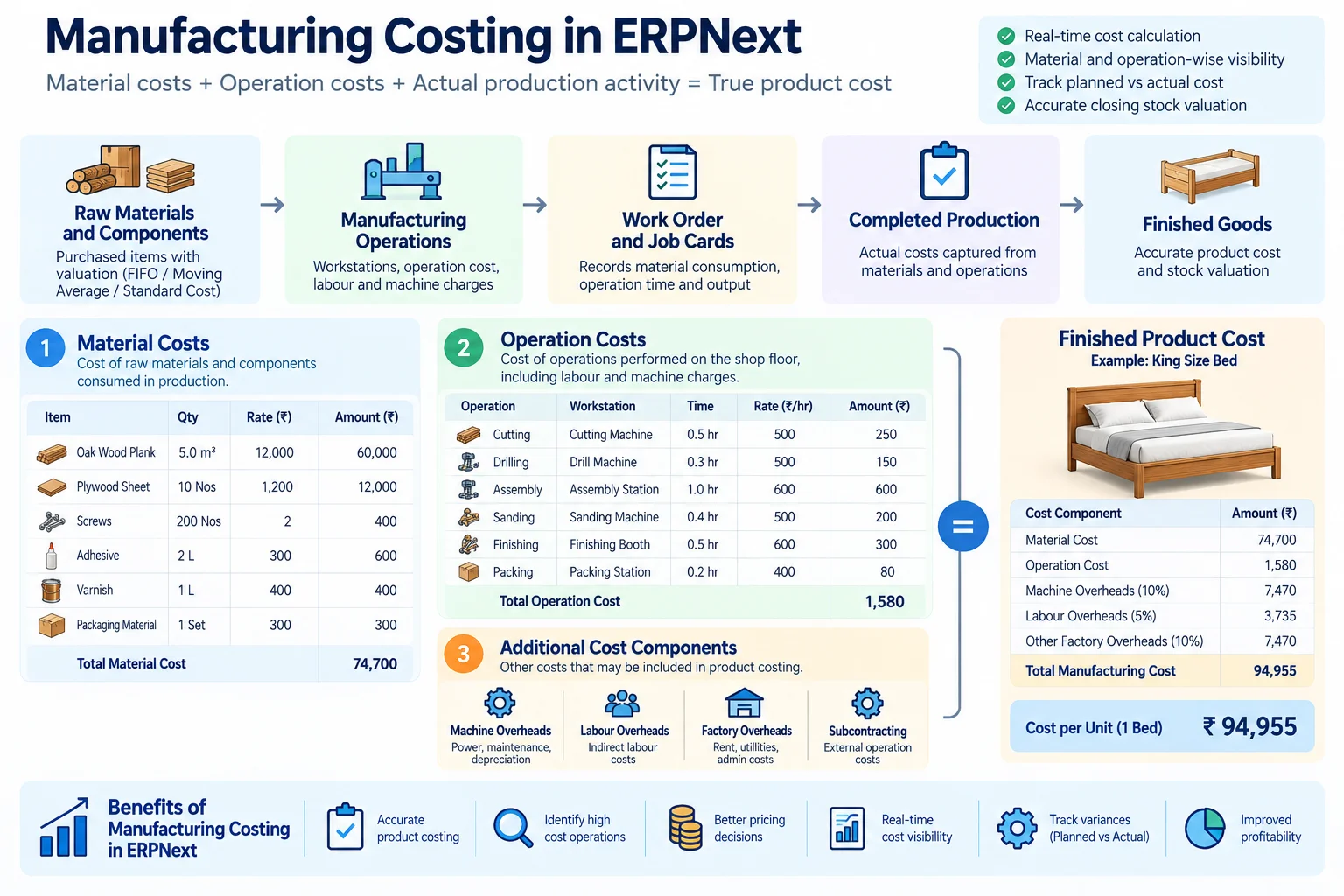
Manufacturing Costing: Can ERPNext Show What Production Actually Costs?
For an owner or finance head, recording production is not enough.
They eventually want to know:
What did this product cost us to make?
Manufacturing cost can involve material cost and operation-related cost. ERPNext BOMs include materials and can include operations, while Workstations can carry operating-cost information. (Frappe Documentation)
But useful costing depends on how accurately production is recorded.
Consider two situations.
Factory A has carefully maintained BOMs, records material consumption, tracks production activity and keeps inventory accurate.
Factory B has approximate BOMs, operators take extra material without recording it, production completion is entered days later and Workstation data is outdated.
Both companies may be using the same ERP.
Their cost information will not have the same quality.
A useful principle is: ERP cannot produce trustworthy manufacturing cost from untrustworthy manufacturing data.
This is why costing design should be discussed during implementation rather than treated as a report that will somehow become accurate after go-live.
Make-to-Order, Make-to-Stock and Different Manufacturing Models
Manufacturing ERP should reflect how demand reaches the factory.
In make-to-order (MTO) production, manufacturing is primarily driven by customer demand. A company may manufacture only after receiving a confirmed order.
In make-to-stock (MTS) production, goods are produced in anticipation of demand and held as finished inventory.
Many manufacturers use both models.
| Planning question | Make-to-order | Make-to-stock |
| Main production trigger | Customer demand | Planned replenishment/demand |
| Finished-goods inventory | Often lower | Typically more significant |
| Planning concern | Order fulfilment and lead time | Availability and inventory balance |
| Risk to control | Delivery delay | Over/under-stocking |
ERPNext’s Production Plan supports planning against Sales Orders as well as internal Material Requests, making the planning structure relevant to different demand models. (Frappe Documentation)
The important implementation decision is not “Which model does ERPNext prefer?”
It is: How does this company decide what to manufacture?
Configure the planning process around that answer.
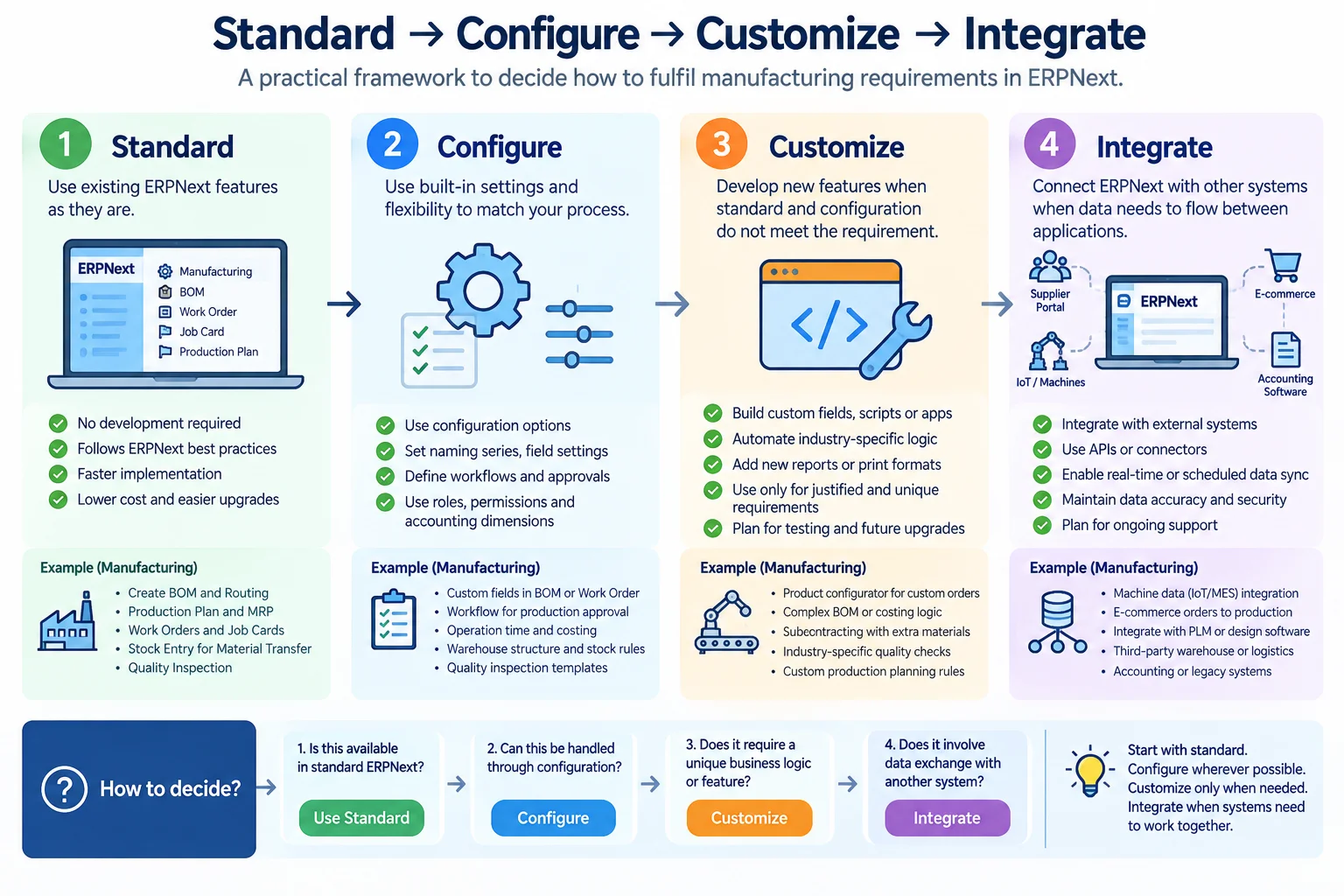
Where Standard ERPNext Is Enough—and Where You May Need More
One of the most expensive mistakes in ERP implementation is confusing a business preference with a software gap.
A user says, “Our old system did this differently.”
That does not automatically mean ERPNext requires customization.
Every requirement should first be placed into one of four categories.
1. Standard
Use ERPNext functionality as designed.
Examples in manufacturing include BOMs, Production Plans, Work Orders, Job Cards, Workstations, manufacturing stock movements and standard subcontracting processes. (Frappe Documentation)
2. Configure
The capability exists, but the company must decide how it should operate.
Examples can include warehouse architecture, permissions, naming, manufacturing settings and approval workflows.
3. Customize
The standard process does not adequately satisfy a justified business requirement, so a change is required.
This should follow fit-gap analysis rather than precede it.
4. Integrate
Another system or machine needs to exchange information with ERPNext.
Examples could include specialized shop-floor systems, machinery, external applications or engineering systems. The exact integration feasibility must be evaluated individually.
| Requirement | First approach to evaluate |
| Multi-level BOM | Standard |
| Production Plan | Standard |
| Work Order | Standard |
| Job Card | Standard |
| Company approval process | Configuration/workflow |
| Company-specific production automation | Standard/configuration first; customize if a genuine gap remains |
| Specialized machine data | Integration assessment |
| External engineering system | Integration assessment |
★ The Important Rule: Do not customize ERPNext simply to reproduce the old system.
A better question is whether the old process exists for a valid operational reason or merely because the previous software worked that way.
Moving from Tally + Excel to ERPNext Manufacturing
For many Indian SMEs, the starting point is not another manufacturing ERP.
It is a combination of tools.
Accounts may be maintained in Tally. Production plans may be in Excel. Stock adjustments may depend on spreadsheets or registers. Sales and purchase teams may maintain their own records.
The issue is not that these tools are inherently poor. The issue appears when the company needs one connected manufacturing process.
Accounting software can tell management what has been financially recorded. A production spreadsheet can help a planner organize work. Neither automatically creates a common operational record connecting demand, material planning, inventory, production and costing.
What should be migrated?
Typical data to evaluate includes:
- Item masters
- Customer and supplier masters
- Chart of Accounts/opening financial data
- Opening stock
- Warehouses
- Outstanding transactions
- BOMs
- Production-related masters
But migration should not become a project to reproduce every historical spreadsheet inside ERPNext.
A better framework is: Migrate — Reconfigure — Rebuild — Archive
Migrate: Clean data required for the new ERP.
Reconfigure: Processes that ERPNext already handles but structures differently.
Rebuild: Data or processes that need to be redesigned before they are useful.
Archive: Historical information that should remain accessible but does not need to become active ERP transactional data.
That decision can significantly reduce unnecessary migration work and prevent poor-quality legacy data from becoming poor-quality ERP data.
What Manufacturers Should Prepare Before ERPNext Implementation
A good ERPNext manufacturing implementation begins before configuration.
Master data readiness
At minimum, evaluate the quality of:
- Item masters
- Units of measure
- BOMs
- Warehouses
- Suppliers and customers
- Operations
- Workstations
- Routings where used
ERPNext itself lists Items, BOMs and Routing among the prerequisites relevant to Production Plans, while Work Orders require manufacturing masters such as BOMs, Operations and Workstations. (Frappe Documentation)
Process readiness
Decide who owns each part of the process.
Who creates or approves BOMs?
Who prepares the Production Plan?
Who releases Work Orders?
Who issues material?
Who records production?
Who completes Job Cards?
Who records scrap?
Who performs quality checks?
Who closes the production process?
ERP software makes responsibilities visible. If nobody owns a process outside the ERP, configuring a screen for it does not solve the ownership problem.
Reporting readiness
Do not begin with a list of 50 reports.
Ask management what decisions they need to make.
Examples:
- What is waiting for production?
- Which material is preventing an order from starting?
- What is currently in production?
- Which operation is delayed?
- What did we plan to consume versus what did we actually consume?
- Which customer orders are at risk of delay?
- What does the product cost to manufacture?
These questions help define the data that must be captured.
Manufacturing ERP readiness checklist
Before implementation, confirm that the business can answer most of these questions:
- Are item codes standardized?
- Are UOMs correct?
- Are active BOMs identified?
- Are subassemblies correctly defined?
- Are production operations documented?
- Are Workstations identified?
- Is the warehouse/WIP structure understood?
- Is physical stock reasonably accurate?
- Is the production planning method defined?
- Are subcontracted processes identified?
- Are batch/serial requirements defined?
- Are quality checkpoints known?
- Is BOM ownership established?
- Are production responsibilities assigned?
- Are required management reports identified?
If several answers are “no,” that does not mean the company is not ready for ERP.
It means process and data preparation need to be part of the implementation scope.
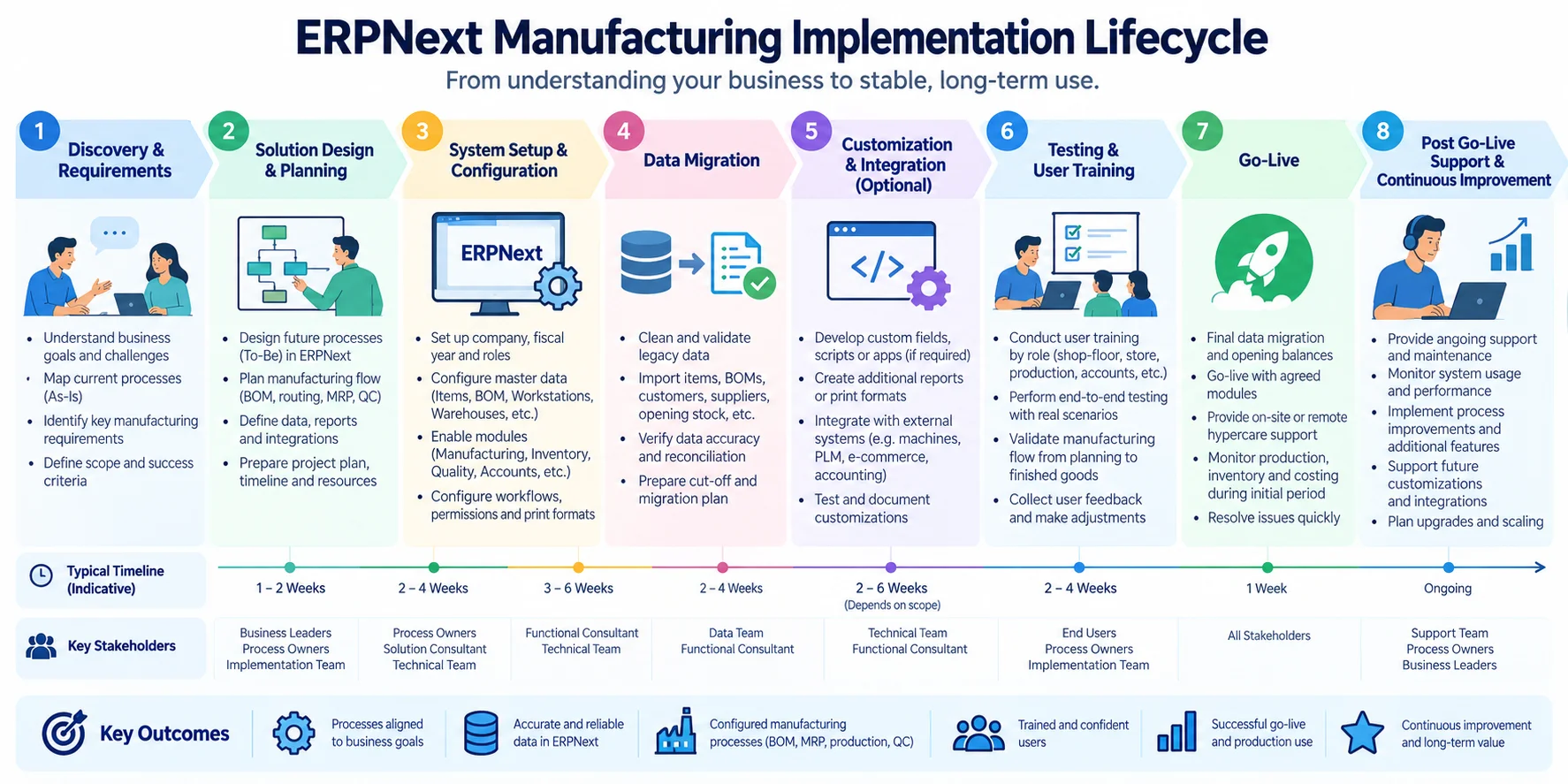
How Long Does ERPNext Manufacturing Implementation Take?
There is no responsible universal answer.
A single-location manufacturer with clean masters, standard processes and limited migration is a different project from a multi-plant business with thousands of BOMs, integrations, specialized approvals and extensive historical data.
Timeline is influenced by factors such as:
- Manufacturing scope
- Number and complexity of BOMs
- Number of locations
- Data quality
- Migration volume
- Required integrations
- Valid customizations
- Availability of customer-side process owners
- User training
- UAT findings
- Go-live approach
A typical project methodology may include: Discovery → Process Mapping → Solution Design → Configuration → Data Preparation/Migration → Testing → Training → UAT → Go-Live → Stabilization
These phases are not necessarily isolated or strictly sequential.
For example, data cleaning can continue while configuration is underway. Training may expose process issues that require adjustment. UAT may identify missing masters or misunderstood requirements.
A project plan should therefore be based on agreed scope and readiness rather than a timeline copied from another implementation.
What Determines ERPNext Manufacturing Implementation Cost?
ERPNext implementation cost is similarly scope-dependent.
Important cost drivers can include:
- Number of business processes in scope
- Manufacturing complexity
- Number of locations
- Master-data preparation
- Data migration
- Required configuration
- Custom development
- Third-party integrations
- Training requirements
- Testing and go-live effort
- Post-go-live support
This is why comparing two ERPNext quotations solely on the final amount can be misleading.
One proposal may cover configuration and training. Another may include detailed process mapping, migration, manufacturing setup, integrations, UAT assistance and post-go-live support.
Compare scope against scope, not price against price.
For a detailed breakdown of the commercial components, see Turqosoft’s guide to ERPNext implementation cost in Kerala.
How to Evaluate an ERPNext Partner for Manufacturing
ERPNext being open source does not make implementation quality interchangeable.
Manufacturing ERP touches physical material, people, machines, inventory, purchasing, finance and customer commitments. An implementation partner therefore needs to understand the operating process behind the software.
Ask the partner to map your manufacturing process
Do not evaluate only through a generic product demonstration.
Give the implementation team an actual manufacturing scenario: Customer demand → BOM → Material planning → Procurement → Work Order → Material issue → Operations → Quality → Finished Goods → Costing
Then ask them to map it to ERPNext.
Ask what is standard, configured, customized and integrated
This is one of the most useful questions an ERP buyer can ask.
For every major requirement, the partner should be able to explain whether it is: Standard ERPNext | Configuration | Customization | Integration
If every unusual requirement immediately becomes custom development, investigate why.
If every requirement is claimed to be standard without demonstrating the process, investigate that too.
Evaluate the implementation method
A manufacturing implementation should account for more than installation and configuration.
Look for a clear approach to:
- Requirements/process discovery
- Master-data preparation
- Solution configuration
- Fit-gap decisions
- Migration
- Testing
- User training
- UAT
- Go-live
- Post-go-live stabilization
Evaluate manufacturing understanding
Ask questions that reveal whether the implementation team understands production rather than only ERPNext screens.
For example:
How would you model our semi-finished goods?
How should we record additional material consumed during production?
How will subcontracting affect our material flow?
How do we distinguish planned material from actual consumption?
How should our Workstations and operations be structured?
What happens when actual production does not follow the BOM exactly?
The quality of those discussions is more informative than a polished generic demo.
The Next Question Is Whether ERPNext Fits Your Factory
ERPNext provides the building blocks for connecting product structures, material planning, production execution, inventory, quality and costing.
But installing those features is not the same as implementing a manufacturing ERP successfully.
BOMs need to represent how products are actually made. Inventory needs to reflect physical stock. Production transactions need to match shop-floor activity. Employees need to know what they are responsible for recording. Reports need to answer questions management actually uses to run the factory.
For a manufacturer evaluating ERPNext, the next step is therefore not necessarily another generic software demo.
It is to map your manufacturing process against ERPNext.
Discuss Your Manufacturing Workflow
If you are evaluating ERPNext for a manufacturing company, Turqosoft can review your current process across BOM, production planning, procurement, inventory, Work Orders, shop-floor operations, quality and costing. Drop us a message, and our experienced team will be delighted to guide you.
You can reach us via email at info@turqosoft.com or give us a call at +91 9841205845.
Or, stay connected with us on LinkedIn, Facebook, Twitter, or Instagram for exciting updates on ERPNext and other relevant topics.